
3D print cost calculator: what prints really cost in the UK
A free calculator for the real cost of a 3D print in the UK, with filament prices, printer power figures and the maths shown.
Some links in this article are affiliate links. If you buy through them, Braindumps may earn a small commission at no extra cost to you.
For most PLA prints, the filament is almost the whole cost. A 50 g figure that takes two and a half hours on a Bambu Lab A1 uses about 90p of filament and about 6p of electricity at today’s UK price cap. Electricity only starts to matter on long prints in hot materials, or on printers that heat a chamber.
The calculator below works out the cost of any print from the numbers your slicer gives you. It uses UK prices for October 2026, shows its working, and you can change every figure to match your own printer, filament and energy tariff.
The calculator needs JavaScript switched on in your browser.
The code for the calculator is included below the article, like the other tools on Braindumps, so you can use it on your own site.
How the calculator works
The total is four costs added together, plus any extra parts. Here is each one, with the reasoning.
Filament
Filament cost = grams used ÷ 1,000 × price per kg.
Your slicer shows the grams after slicing. If it only shows metres, the calculator converts them. A metre of 1.75 mm filament is a cylinder 0.0875 cm in radius and 100 cm long, so its volume is π × 0.0875² × 100 = 2.405 cm³. Multiply that by the density of the plastic to get grams per metre:
| Material | Density (g/cm³) | Grams per metre (1.75 mm) | Metres in a 1 kg spool |
|---|---|---|---|
| PLA | 1.24 | 2.98 | about 335 |
| PETG | 1.23 to 1.28 | 2.96 to 3.08 | about 330 |
| ABS | 1.04 | 2.50 | about 400 |
| ASA | 1.05 to 1.07 | 2.53 to 2.57 | about 390 |
| TPU 95A | 1.20 to 1.24 | 2.89 to 2.98 | about 340 |
The weight on a spool label is the plastic only, not the spool, so a “1 kg” spool gives you 1,000 g to print with.
Electricity
Energy (kWh) = average watts ÷ 1,000 × hours. Electricity cost = kWh × price per kWh.
The calculator starts with 26.32p per kWh, which is Ofgem’s price cap for 1 October to 31 December 2026 (Great Britain average, paying by direct debit). Ofgem says there is no VAT on household electricity from 1 October 2026 to 31 March 2027, so that figure is the full price. If your tariff is different, type in your own rate from your bill.
The daily standing charge (54.83p a day under the current cap) is left out on purpose. You pay it whether or not the printer is on, so it is not part of the cost of a print.
The next cap, for January to March 2027, will be announced on 25 November 2026. Cornwall Insight’s forecast at the end of September was about 30.3p per kWh, so electricity is likely to get a little dearer in the new year.
Printer wear
This is off by default, because most people printing for themselves do not count it. If you sell prints, switch it on.
Wear per hour = printer price ÷ expected working hours. A common rule of thumb is a working life of 2,000 to 2,500 hours, so a £300 printer costs about 12 to 15p an hour. Nozzles and build plates are part of this too: a hardened steel nozzle costs about £14 to £19 in the UK and a textured PEI plate from about £18, and owners report both lasting well over 1,000 hours. These are rules of thumb, not measured lifetimes.
Failures
Some prints fail, and the filament and time are lost. The calculator adds a percentage to cover them. Guides from Siraya and Flashforge suggest 5 to 15%, and 10% is a sensible starting point. Nobody publishes measured failure rates, so adjust it to your own experience.
How much electricity printers really use
The number on the power supply is the maximum, not what the printer uses. A printer draws a lot for a few seconds while the bed and nozzle heat up together, then settles to a much lower average. That average is what matters for cost.
| Printer | Maker’s average, printing PLA | Independent measurement, printing PLA | Cost per hour at 26.32p |
|---|---|---|---|
| Bambu Lab A1 mini | 80 W | about 85 W | 2.1p |
| Bambu Lab A1 | 95 W | about 120 to 130 W | 2.5p |
| Bambu Lab P1S | 105 W | about 120 W | 2.8p |
| Bambu Lab X1C | 105 W | none found | 2.8p |
| Bambu Lab P2S | 200 W (steady state) | none found | 5.3p |
| Bambu Lab H2D | 197 W | about 220 W | 5.2p |
| Prusa Core One | 90 W | none found | 2.4p |
| Prusa MK4S | 80 W | none found | 2.1p |
| Creality K2 Plus (ad) | not published | 249 W (with a warm chamber) | 6.6p |
| Elegoo Centauri Carbon | not published | about 160 W | 4.2p |
| Anycubic Kobra 3 | not published | 205 W | 5.4p |
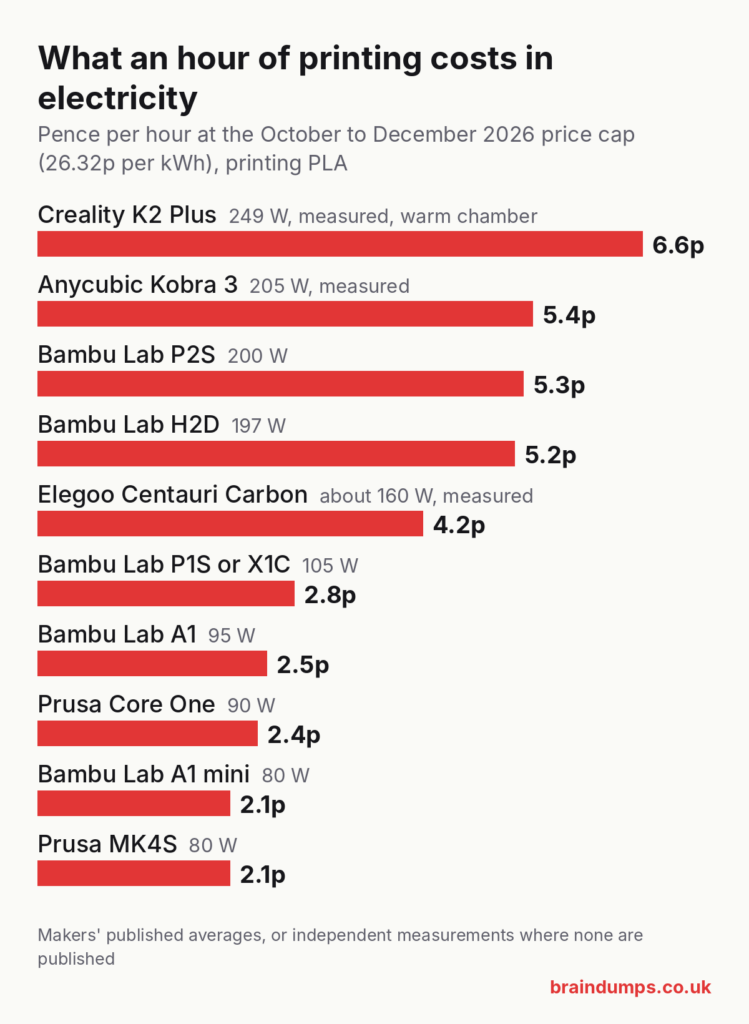
Cost per hour uses the maker’s figure where there is one, and the measured figure where there is not. Independent measurements, mostly from igorsLAB’s reviews, came out between 0 and 25% above the makers’ own averages, so allow a little extra.
The heat-up spikes look alarming but cost almost nothing. igorsLAB measured the H2D peaking at 1,732 W, but only for seconds at a time. A full minute at 1.7 kW would cost under 1p.
What filament costs in the UK
Prices for a 1 kg spool from UK shops in October 2026, including VAT. The calculator starts with the typical figure for each material.
| Material | Low | Typical | High |
|---|---|---|---|
| PLA (ad) | £12 to £14 (Bambu Lab bulk sale) | £18 to £20 (Bambu Lab, 3DQF) | £31 (Prusament) |
| PETG (ad) | £12 to £14 (Bambu Lab bulk sale) | £18 to £19 (Bambu Lab, 3DQF) | £37 (Prusament) |
| ABS (ad) | £12 to £14 (Bambu Lab bulk sale) | £18 to £22 (Bambu Lab, 3DQF) | – |
| ASA (ad) | £19 (123-3D own brand) | £21 (3DQF) | £28 (Bambu Lab) |
| TPU 95A (ad) | £19 (eSUN) | £34 to £35 (Polymaker, Bambu Lab) | £39 (Bambu Lab 95A HF) |
| Glow-in-the-dark PLA (ad) | £19 (Sunlu, on sale) | £23 (Bambu Lab) | £25 (Polymaker) |
The gap between cheap and premium filament is bigger than every other cost in a typical print put together. If you print a lot, filament price is the number to watch.
A worked example
Take a 50 g PLA figure that prints in 2 hours 30 minutes on a Bambu Lab A1, using £17.99 filament.
| Cost | Working | Amount |
|---|---|---|
| Filament | 50 g ÷ 1,000 × £17.99 | 90.0p |
| Electricity | 95 W ÷ 1,000 × 2.5 h = 0.2375 kWh, × 26.32p | 6.3p |
| Failure allowance | 10% of 96.3p | 9.6p |
| Total | £1.06 |
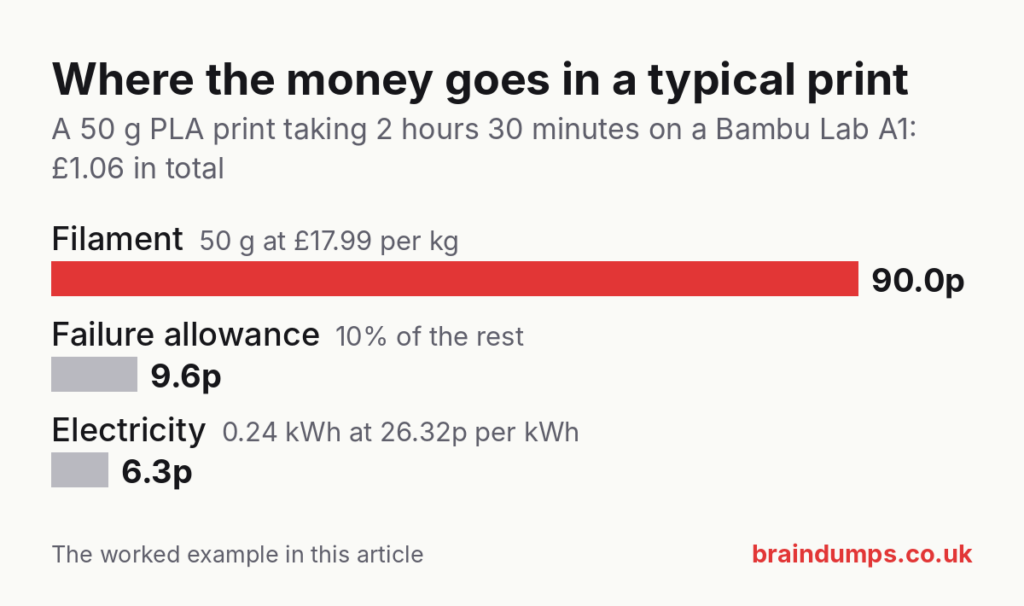
Switch on printer wear for a £300 printer over 2,000 hours, and the wear adds 37.5p (£300 ÷ 2,000 × 2.5). With the 10% allowance on top, the total becomes £1.47. If the plate holds four figures, each one costs about 37p.
The electricity is about 6% of the total here. Wear and failures matter more than the power bill.
When electricity does matter
- Hot materials on big machines. Bambu Lab rates the H2D at 395 W on average when printing polycarbonate. A 10-hour polycarbonate print uses about 4 kWh, which is just over £1.
- Heated chambers. igorsLAB measured the H2D drawing about 580 W while it warmed its chamber from 25 to 60°C, which took about 15 minutes.
- Leaving the printer switched on. An A1 on standby draws about 7 W, which is about 4p a day or £16 a year. An H2D draws about 16 W on standby, which is about 10p a day or £38 a year. Switching off at the wall when you are not printing saves more than most people expect.
Questions people ask
How much electricity does a 3D printer use? Most home printers average between 80 and 250 W while printing PLA. At 26.32p per kWh, that is about 2p to 7p an hour.
Should I include the standing charge? No. You pay the standing charge every day whether or not you print, so it does not change with how much you print.
How many metres are on a 1 kg spool of PLA? About 335 m of 1.75 mm filament. Each metre weighs about 2.98 g.
Sources
Checked on 14 October 2026: Ofgem price cap news and unit rates; Cornwall Insight cap forecast; Bambu Lab power consumption and P2S FAQ; Prusa’s Core One and MK4S pages; igorsLAB reviews of the A1 mini, A1, P1S, H2D, Centauri Carbon and Kobra 3; K2 Plus test; filament prices from Bambu Lab UK, 3DQF, 123-3D and Sunlu UK; densities from All3DP and Polymaker; costing rules of thumb from Siraya and Flashforge.
Use this calculator on your own site
You are welcome to use this calculator on your own website. Copy the code below into a Custom HTML block in WordPress, or into any web page. It needs no other files. We only ask that you keep the link to Braindumps at the bottom.
<!-- Braindumps 3D print cost calculator. Paste into a Custom HTML block. Self-contained: no external files. -->
<div id="bd-pcc">
<style>
#bd-pcc{--bd-red:#d63333;--bd-line:rgba(127,127,127,.35);--bd-soft:rgba(127,127,127,.08);font:inherit;color:inherit;max-width:760px;margin:1.5em 0}
#bd-pcc *{box-sizing:border-box}
#bd-pcc [hidden]{display:none!important}
#bd-pcc fieldset{border:1px solid var(--bd-line);border-radius:10px;padding:14px 16px 6px;margin:0 0 14px}
#bd-pcc legend{font-weight:700;padding:0 6px}
#bd-pcc .row{display:grid;grid-template-columns:1fr 1fr;gap:10px 16px}
@media (max-width:560px){#bd-pcc .row{grid-template-columns:1fr}}
#bd-pcc label{display:block;font-size:.92em;margin-bottom:10px}
#bd-pcc label span.hint{display:block;opacity:.7;font-size:.88em}
#bd-pcc input,#bd-pcc select{width:100%;padding:8px 10px;margin-top:4px;border:1px solid var(--bd-line);border-radius:6px;font:inherit;background:transparent;color:inherit}
#bd-pcc select option{color:#111}
#bd-pcc .inline{display:flex;gap:8px}
#bd-pcc .inline input{flex:1;min-width:0}
#bd-pcc .inline select{width:auto;flex:0 0 auto}
#bd-pcc .check{display:flex;align-items:center;gap:8px}
#bd-pcc .check input{width:auto;margin:0}
#bd-pcc .result{border:2px solid var(--bd-red);border-radius:10px;padding:14px 16px;background:var(--bd-soft)}
#bd-pcc .total{font-size:1.6em;font-weight:700;margin:0 0 4px}
#bd-pcc table{width:100%;border-collapse:collapse;margin:8px 0}
#bd-pcc td{padding:5px 0;border-bottom:1px solid var(--bd-line)}
#bd-pcc td:last-child{text-align:right;font-variant-numeric:tabular-nums;white-space:nowrap}
#bd-pcc details{margin-top:10px}
#bd-pcc summary{cursor:pointer;font-weight:600}
#bd-pcc pre{white-space:pre-wrap;font-size:.88em;background:var(--bd-soft);padding:10px;border-radius:6px;margin:8px 0 0}
#bd-pcc .note{font-size:.85em;opacity:.75;margin-top:8px}
#bd-pcc .credit{font-size:.85em;opacity:.75;margin:10px 0 0}
</style>

<fieldset>
<legend>The print</legend>
<div class="row">
<label>Filament used
<span class="inline"><input id="bd-amount" type="number" min="0" step="0.1" value="50" inputmode="decimal" aria-describedby="bd-amount-h"><select id="bd-unit" aria-label="Unit"><option value="g">grams</option><option value="m">metres</option></select></span>
<span class="hint" id="bd-amount-h">Your slicer shows this after slicing.</span></label>
<label>Print time
<span class="inline"><input id="bd-hours" type="number" min="0" step="1" value="2" aria-label="Hours" inputmode="numeric"><input id="bd-mins" type="number" min="0" max="59" step="1" value="30" aria-label="Minutes" inputmode="numeric"></span>
<span class="hint">Hours and minutes.</span></label>
<label>Material
<select id="bd-material">
<option value="PLA" data-price="17.99" data-density="1.24">PLA</option>
<option value="PETG" data-price="17.99" data-density="1.27">PETG</option>
<option value="ABS" data-price="17.99" data-density="1.04">ABS</option>
<option value="ASA" data-price="20.99" data-density="1.07">ASA</option>
<option value="TPU" data-price="34.99" data-density="1.22">TPU 95A</option>
<option value="GLOW" data-price="22.99" data-density="1.24">Glow-in-the-dark PLA</option>
</select></label>
<label>Filament price per kg (£)
<input id="bd-price" type="number" min="0" step="0.01" value="17.99" inputmode="decimal">
<span class="hint">Typical UK price, October 2026. Change it to what you paid.</span></label>
<label>Items on the plate
<input id="bd-qty" type="number" min="1" step="1" value="1" inputmode="numeric"></label>
<label>Extra parts (£)
<input id="bd-extras" type="number" min="0" step="0.01" value="0" inputmode="decimal">
<span class="hint">Magnets, LEDs, screws, for the whole plate.</span></label>
</div>
</fieldset>

<fieldset>
<legend>The printer and electricity</legend>
<div class="row">
<label>Printer
<select id="bd-printer">
<option value="80">Bambu Lab A1 mini (80 W)</option>
<option value="95" selected>Bambu Lab A1 (95 W)</option>
<option value="105">Bambu Lab P1S or X1C (105 W)</option>
<option value="200">Bambu Lab P2S (200 W)</option>
<option value="197">Bambu Lab H2D (197 W)</option>
<option value="90">Prusa Core One (90 W)</option>
<option value="80">Prusa MK4S (80 W)</option>
<option value="249">Creality K2 Plus (249 W, measured)</option>
<option value="160">Elegoo Centauri Carbon (160 W, measured)</option>
<option value="205">Anycubic Kobra 3 (205 W, measured)</option>
<option value="custom">Other: enter the watts</option>
</select>
<span class="hint">Average while printing PLA. Hotter materials and heated chambers use more.</span></label>
<label>Average power (watts)
<input id="bd-watts" type="number" min="0" step="1" value="95" inputmode="numeric"></label>
<label>Electricity price (pence per kWh)
<input id="bd-rate" type="number" min="0" step="0.01" value="26.32" inputmode="decimal">
<span class="hint">Ofgem price cap, 1 October to 31 December 2026.</span></label>
<label>Failure allowance (%)
<input id="bd-fail" type="number" min="0" max="100" step="1" value="10" inputmode="numeric">
<span class="hint">Covers the prints that go wrong. 5 to 15% is usual.</span></label>
</div>
<label class="check"><input id="bd-wear-on" type="checkbox"> Include printer wear and tear</label>
<div class="row" id="bd-wear-row" hidden>
<label>Printer price (£)
<input id="bd-cost" type="number" min="0" step="1" value="300" inputmode="numeric"></label>
<label>Expected working life (hours)
<input id="bd-life" type="number" min="1" step="100" value="2000" inputmode="numeric">
<span class="hint">2,000 to 2,500 hours is a common rule of thumb.</span></label>
</div>
</fieldset>

<div class="result" aria-live="polite">
<p class="total" id="bd-total">£0.00</p>
<p id="bd-each"></p>
<table><tbody id="bd-lines"></tbody></table>
<details><summary>Show the working</summary><pre id="bd-working"></pre></details>
<p class="note">Electricity uses the unit rate only. The daily standing charge is paid whether or not you print, so it is not part of the cost of a print.</p>
</div>

<p class="credit">Calculator by <a href="https://braindumps.co.uk/3d-print-cost-calculator/">Braindumps.co.uk</a></p>
<script>
(function () {
  "use strict";
  /* BEGIN CALC */
  function printCost(o) {
    var grams = o.unit === "m" ? o.amount * Math.PI * Math.pow(0.0875, 2) * 100 * o.density : o.amount;
    var hours = Math.max(0, o.hours) + Math.max(0, o.minutes) / 60;
    var filament = grams / 1000 * o.pricePerKg;
    var kwh = o.watts / 1000 * hours;
    var electricity = kwh * o.ratePence / 100;
    var wear = o.wearOn && o.lifeHours > 0 ? o.printerPrice / o.lifeHours * hours : 0;
    var subtotal = filament + electricity + wear;
    var failure = subtotal * o.failurePct / 100;
    var total = subtotal + failure + o.extras;
    var qty = Math.max(1, Math.floor(o.qty));
    return { grams: grams, hours: hours, kwh: kwh, filament: filament, electricity: electricity, wear: wear, failure: failure, extras: o.extras, total: total, each: total / qty, qty: qty };
  }
  /* END CALC */

  var root = document.getElementById("bd-pcc");
  if (!root) { return; }
  function el(id) { return document.getElementById(id); }
  function num(id) { var v = parseFloat(el(id).value); return isFinite(v) && v >= 0 ? v : 0; }
  function money(v) { return "£" + v.toFixed(2); }
  function pence(v) { return v < 1 ? (v * 100).toFixed(1) + "p" : money(v); }

  function update() {
    var mat = el("bd-material").selectedOptions[0];
    var r = printCost({
      amount: num("bd-amount"), unit: el("bd-unit").value, density: parseFloat(mat.dataset.density),
      hours: num("bd-hours"), minutes: num("bd-mins"), pricePerKg: num("bd-price"),
      watts: num("bd-watts"), ratePence: num("bd-rate"), failurePct: num("bd-fail"),
      wearOn: el("bd-wear-on").checked, printerPrice: num("bd-cost"), lifeHours: num("bd-life"),
      extras: num("bd-extras"), qty: num("bd-qty") || 1
    });
    el("bd-total").textContent = money(r.total) + (r.qty > 1 ? " for the plate" : " for this print");
    el("bd-each").textContent = r.qty > 1 ? money(r.each) + " each for " + r.qty + " items" : "";
    var rows = [["Filament (" + r.grams.toFixed(1) + " g)", r.filament], ["Electricity (" + r.kwh.toFixed(4) + " kWh)", r.electricity]];
    if (el("bd-wear-on").checked) { rows.push(["Printer wear", r.wear]); }
    rows.push(["Failure allowance (" + num("bd-fail") + "%)", r.failure]);
    if (r.extras > 0) { rows.push(["Extra parts", r.extras]); }
    var body = el("bd-lines");
    body.textContent = "";
    rows.forEach(function (row) {
      var tr = document.createElement("tr");
      var a = document.createElement("td"); a.textContent = row[0];
      var b = document.createElement("td"); b.textContent = pence(row[1]);
      tr.appendChild(a); tr.appendChild(b); body.appendChild(tr);
    });
    var w = [];
    if (el("bd-unit").value === "m") {
      w.push("Grams = metres × π × 0.0875² cm² × 100 cm/m × density");
      w.push("      = " + num("bd-amount") + " × 2.405 cm³ × " + mat.dataset.density + " g/cm³ = " + r.grams.toFixed(1) + " g");
    }
    w.push("Filament    = " + r.grams.toFixed(1) + " g ÷ 1,000 × £" + num("bd-price").toFixed(2) + " = " + money(r.filament));
    w.push("Energy      = " + num("bd-watts") + " W ÷ 1,000 × " + r.hours.toFixed(2) + " h = " + r.kwh.toFixed(4) + " kWh");
    w.push("Electricity = " + r.kwh.toFixed(4) + " kWh × " + num("bd-rate") + "p = " + (r.electricity * 100).toFixed(2) + "p");
    if (el("bd-wear-on").checked) { w.push("Wear        = £" + num("bd-cost") + " ÷ " + num("bd-life") + " h × " + r.hours.toFixed(2) + " h = " + money(r.wear)); }
    w.push("Allowance   = " + num("bd-fail") + "% of the above = " + money(r.failure));
    if (r.extras > 0) { w.push("Extras      = " + money(r.extras)); }
    w.push("Total       = " + money(r.total));
    el("bd-working").textContent = w.join("\n");
  }

  el("bd-material").addEventListener("change", function () {
    el("bd-price").value = el("bd-material").selectedOptions[0].dataset.price;
    update();
  });
  el("bd-printer").addEventListener("change", function () {
    var v = el("bd-printer").value;
    if (v !== "custom") { el("bd-watts").value = v; } else { el("bd-watts").focus(); }
    update();
  });
  el("bd-wear-on").addEventListener("change", function () {
    el("bd-wear-row").hidden = !el("bd-wear-on").checked;
    update();
  });
  root.addEventListener("input", update);
  update();
})();
</script>
</div>