
AI tools for makers: what is new in October 2026
The new AI models and maker tools from the last six weeks, what you can use free in the UK, and what to check before you trust the results.
In six weeks, Anthropic, OpenAI, Google and xAI all released new AI models, and several open models arrived that anyone can download. For people who build things, three changes matter most: the free tiers now include much stronger models, turning a photo into a printable 3D model has become cheap and quick, and an electronics design tool can now draw a printable case around your circuit board.
This article covers what is new, what you can use for free in the UK, and what to check before you trust the results. Facts were checked on 14 October 2026. AI tools change monthly, so a new version of this article will appear each month.
The new models at a glance
The “Independent score” column is the Artificial Analysis Intelligence Index, an independent combined score across many tests. Higher is better, and it is a guide rather than a verdict. Prices are what developers pay per million tokens (roughly 750,000 words) going in and coming out; app subscriptions are covered in the next section.
| Model | Released | What changed | Developer price (in / out) | Independent score |
|---|---|---|---|---|
| Claude Opus 5.5 (Anthropic) | 22 Sep | Anthropic says about 40% cheaper to run than Opus 5 and over 30% faster | $4 / $20 | 58 |
| Claude Sonnet 5.5 (Anthropic) | 28 Sep | Anthropic reports a large jump on a coding test (Terminal-Bench 4.0, from 10.3% to 70.6%) | $2 / $10 | 56 |
| GPT-6 Astra (OpenAI) | 3 Sep | OpenAI’s new flagship model | $10 / $50 | 53 |
| Gemini 4 Argon (Google) | 30 Sep, generally available 13 Oct | Google’s new flagship; Google’s own tables put it behind Opus 5.5 on Terminal-Bench 4.0 | $2 / $10 at first, then $4 / $20 | 53 |
| GPT-6.1 Sol (OpenAI) | 29 Sep | The mid-range GPT-6 model used in paid ChatGPT plans | $2 / $10 | 52 |
| Grok 4.7 (xAI) | 21 Sep | A new, larger base model | $2 / $6 | 46 |
| MiMo-V2.6 Pro (Xiaomi) | about 22 Sep | Open model; weights downloadable | not offered free | 46 |
| Claude Haiku 5.5 (Anthropic) | 7 Oct | About 75% cheaper than Haiku 4.5; Anthropic still recommends Sonnet or Opus for complex coding | $0.10 / $0.50 | 43 |
| DeepSeek-V4.1-Flash | 10 Sep | Open model that also understands images | see DeepSeek | 39 |
| GPT-6 Luna (OpenAI) | 22 Sep | Small, fast model now used in free ChatGPT | $0.10 / $0.50 | 38 |
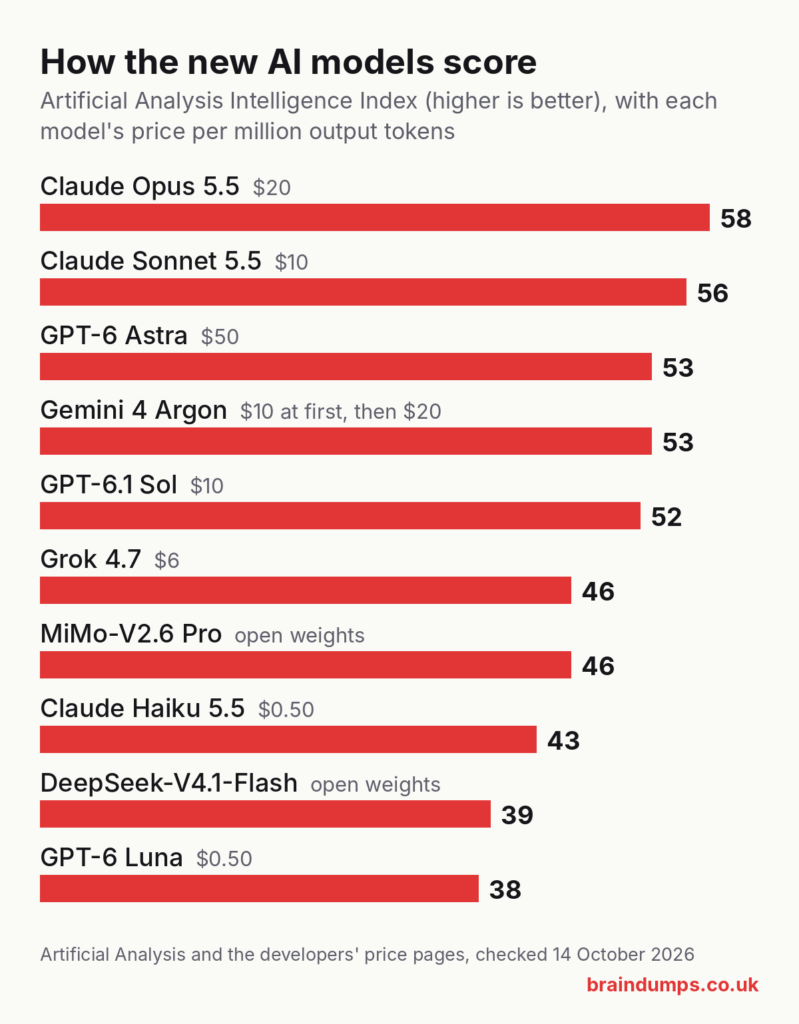
Most speed and cost claims in that table are the companies’ own figures. The independent scores are closer together than the marketing suggests: for everyday help with code and projects, any of the top five will do a good job.
Free AI help for code and projects
You do not need to pay to get useful help with an Arduino sketch, a Pico project or a small website. This is what each free option gives a UK user now.
| Service | What the free plan gets you | Paid plan from |
|---|---|---|
| Claude (claude.ai) | Claude Sonnet 5.5, with usage limits. Opus and Claude Code need a paid plan. | $17 a month billed yearly, or $20 monthly |
| ChatGPT | GPT-6 Luna since 8 October, plus a limited allowance of Codex, OpenAI’s coding agent | Prices not shown on OpenAI’s page when checked |
| Gemini | Gemini Flash-Lite only | Google AI Plus £4.49 a month, AI Pro £18.99 |
| Grok | Daily access, but xAI does not say which model | $8 a month |
| GitHub Copilot Free | 2,000 code completions a month in your editor | $10 a month |
| Arduino Cloud AI Assistant | 30 questions a month | Arduino Cloud plans |
A few practical points:
- Which free option is strongest? On the independent scores above, Claude’s free plan currently uses the highest-scoring free model (Sonnet 5.5, scoring 56, against 38 for ChatGPT’s free Luna). Free limits change often, so it is worth trying two and keeping the one that suits your projects.
- Coding agents. These read your project folder and make changes themselves. Free routes include the limited Codex allowance in ChatGPT, Google’s Antigravity CLI and xAI’s Grok Build. Run them on a copy of your project, or use git, so you can undo changes.
- Running a model at home. The big open models are far too large for a home computer. Smaller open models, such as Qwen3.8-27B (released in August under the Apache 2.0 licence), are said to fit on a single high-end graphics card. Smaller models generally score lower than the top online ones, so treat home-run models as a privacy or offline option rather than the best help available.
Turning a picture into a 3D print
Image-to-3D tools take a photo or drawing and produce a 3D model you can slice. They are good for figures, ornaments and display pieces. They are not suited to parts that must fit or carry a load, because the shapes are approximations rather than measured designs.
| Tool | Free use | Can you sell prints from free models? | Files you can download |
|---|---|---|---|
| MakerWorld MakerLab (Bambu Lab) | Two trial generations, then credit packs from $3 for 350 credits; one model costs 24 to 45 credits depending on the engine | Not stated for generated models | STL, GLB and a multicolour 3MF ready for Bambu’s AMS (Meshy engine) |
| Meshy | 100 credits and 10 downloads a month | Yes, with credit: free models are CC BY 4.0 | STL, OBJ, FBX, GLB, USDZ, BLEND (no 3MF) |
| Tripo | 200 credits a month, about 13 models | No: free models are public and for non-commercial use | STL, OBJ, 3MF, FBX, GLB, USD |
What is new:
- MakerLab now offers five engines (Tripo 3.1, Hitem3D 2.1, Hunyuan 3D 3.1, Meshy 6 and Rodin Gen-2), each with its own credit cost. The old monthly free credits have been replaced by a small number of trial uses.
- Meshy released versions 7 (August) and 7.1 (September, with more detail in the shape). Its Auto Split feature now takes written instructions, and it can add interlocking connectors so the split parts push together without glue.
AI help with CAD
Two tools aim at real, measured designs rather than sculpted shapes. Zoo offers a chat-based CAD assistant you can use free in the browser; its limits and export formats were not listed when checked. Adam works inside Onshape and Fusion to edit existing models, with a free tier but no published prices. Both are worth trying for simple brackets and enclosures, but check every dimension before you print.
Electronics design and print monitoring
- Flux (circuit boards). Flux is a browser-based tool for designing printed circuit boards, with an AI assistant built in. In September it added an enclosure generator: you describe the case you want, and it produces a 3D-printable enclosure that stays matched to your board as the design changes. Flux exports Gerber, bill of materials and pick-and-place files for board makers. It is not free: there is a 14-day trial, and students get the Core plan free. Since August it has also had a connector (an MCP server) that lets AI assistants such as Claude, Cursor and Codex work in Flux directly.
- Bambu Lab printers check for failed prints on the printer itself, with no cloud service needed. The H2D’s nozzle camera also spots blobs on the nozzle and “air printing”, where the nozzle moves but no plastic comes out.
- Obico watches other printers through a camera and stops a print that has turned into spaghetti. It works with Klipper, OctoPrint and Bambu Lab printers. The free plan covers one printer and 10 hours of detection a month; AI Premium is $6.99 a month billed yearly. You can also run it on your own computer, free and without limits. Its newer detection model, released in May, is only on the paid plans.
Before you print an AI model
Check the mesh. AI-generated models often have holes, loose floating pieces, surfaces facing the wrong way, far more triangles than they need, and walls too thin to print. Your slicer will warn about some of these. For the rest, free Blender add-ons such as 3D Print Toolbox can find and repair them. Meshy’s chief executive has said thin walls are still an unsolved problem, so check the thinnest parts in the slicer preview before you start a long print.
Know the rules where you share. Since February, MakerWorld has required every model to include at least one clear photo of the real printed object. Bambu Lab’s AI policy page for MakerWorld, which asked for AI-made models to be tagged “AIGC”, is no longer online, so check MakerWorld’s current rules before you upload. Printables has a filter that hides AI-generated models. Reports about Thingiverse conflict: one said in February it planned AI labels, and another in March said it now rejects AI models entirely.
Check the licence before you sell. Meshy’s free models can be sold if you credit Meshy. Tripo’s free models are for non-commercial use only. MakerLab does not state the terms for generated models, so ask Bambu Lab before selling.
Do not trust AI with mains or batteries. AI assistants are good at explaining circuits and writing code, but they can be confidently wrong. Never follow AI instructions for mains wiring; Electrical Safety First recommends a registered electrician for electrical installation work. For lithium batteries, check any charging circuit against the battery and charger datasheets, use the correct charger, and do not leave batteries charging overnight or while you are out, as UK fire services advise.
Questions people ask
What is the best free AI for coding in the UK? On independent scores, Claude’s free plan (using Sonnet 5.5) currently has the strongest free model, with ChatGPT’s free Luna model and GitHub Copilot Free also useful. Limits change often, so try two.
Can AI make an STL file for 3D printing? Yes. MakerLab, Meshy and Tripo all turn a photo or text into a model you can download as an STL, and MakerLab and Tripo also give 3MF files. Expect to repair or simplify the mesh before printing.
Can I sell 3D prints of AI-generated models? It depends on the tool’s licence. Meshy’s free models can be sold with credit, Tripo’s free models cannot, and paid plans on both allow commercial use.
Sources
Checked on 14 October 2026. Updated on 27 October 2026 to replace two links that no longer work. Models: Claude Opus 5.5, Sonnet 5.5, Haiku 5.5, Claude pricing, OpenAI API changelog, GPT-6 in ChatGPT, ChatGPT plans, Gemini 4 Argon, Gemini UK plans, HackerNoon on Argon’s benchmarks, Grok 4.7, X Subscription, DeepSeek-V4.1, Xiaomi MiMo-V2.6, Qwen3.8-27B, Artificial Analysis leaderboard, GitHub Copilot plans, Arduino AI Assistant. Maker tools: MakerLab credits, MakerWorld upload guidelines, Meshy pricing, Meshy changelog, Tripo pricing, Tripo exports, Zoo, Adam, Flux enclosures, Flux plans, Bambu Lab detection, Obico pricing. Cautions: All3DP on repairing AI models, 3D Printing Industry interview, Fabbaloo, All3DP on Thingiverse, Electrical Safety First, Cheshire Fire on lithium batteries.