
The best free 3D prints for October 2026
Ten free 3D prints for October 2026: five for Halloween and five you will still use in January, with print tips and what people who printed them report.
Some links in this article are affiliate links. If you buy through them, Braindumps may earn a small commission at no extra cost to you.
Halloween falls on a Saturday this year, and the clocks go back on Sunday 25 October. That gives two weeks of dark evenings for anything that glows, so five of this month’s ten picks are for Halloween. The other five are things you will still use in January.
I chose them from the models trending on Printables over the last 30 days and from MakerWorld’s Halloween collections, checked on 14 October 2026. I left out designs based on film, TV or game characters, because many of those copy someone else’s work, and anything shaped like a weapon. Every model here is free to download, and the like and download counts are as they stood on 14 October.
Each pick comes with a short note on how to print it well and why that works, plus what people who have already printed it report.
| Pick | Where | What you need besides filament |
|---|---|---|
| 1. Halloween Ghosts – 9 Expressive Faces | Printables | Nothing (glow-in-the-dark PLA looks best) |
| 2. Shy Ghost | Printables | Nothing |
| 3. LEGO-style head lantern | Printables | An LED tealight |
| 4. Tiny glowing jack-o’-lantern | MakerWorld | A small LED with a magnetic switch |
| 5. Halloween Jack-O’-Lantern by Bambu Lab | MakerWorld | An LED light for the base |
| 6. USB-C and device port cleaning tool | Printables | Nothing (PETG recommended) |
| 7. Swing-out under-desk keyboard tray | Printables | Screws and a small spring |
| 8. Heavy-duty wall hook | Printables | Wall screws |
| 9. FORMA Box storage system | Printables | Nothing |
| 10. MDU-12 modular cyberdeck | Printables | A Framework mainboard, a screen, Raspberry Pi Picos and more |
Halloween prints
1. Halloween Ghosts – 9 Expressive Faces
By Anteater Prints on Printables · 242 likes, 1,037 downloads · model page
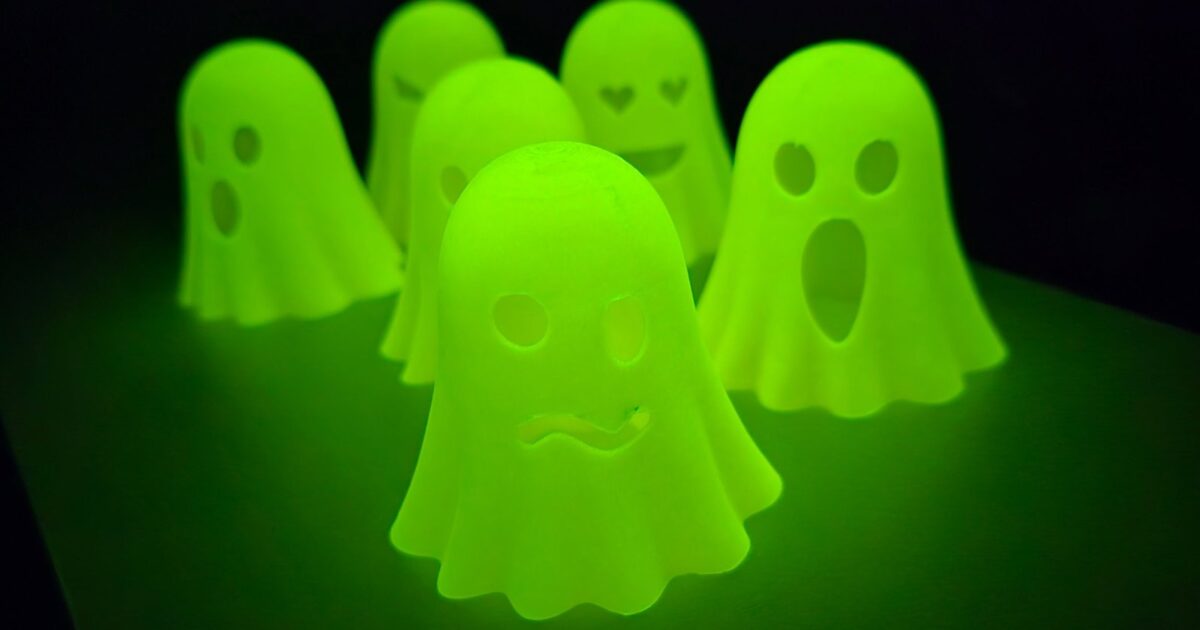
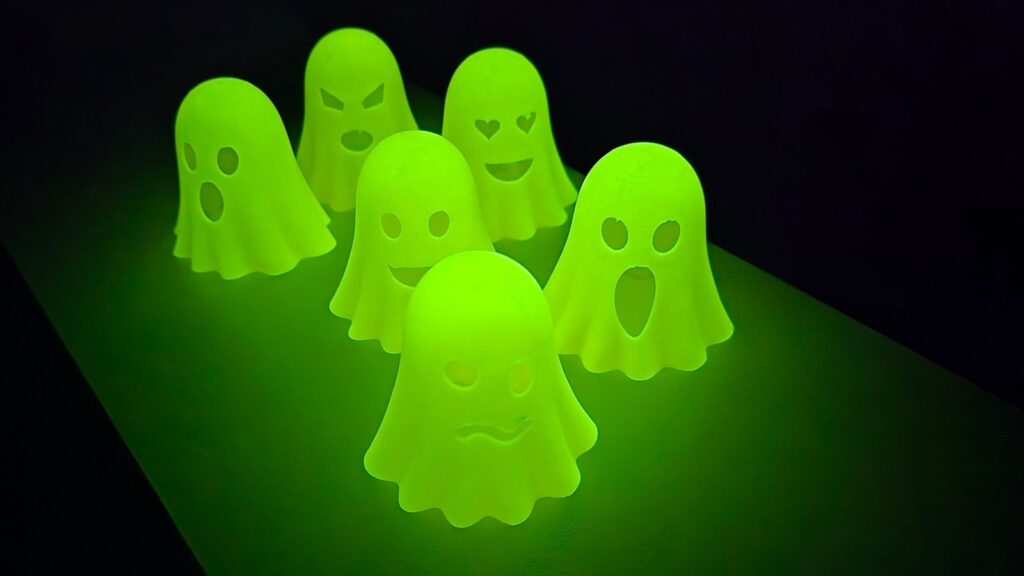
Nine hollow ghosts in draped sheets, each with a different face: happy, angry, heart eyes, dizzy, a wink, a scream and three more. Each ghost is about 65 mm wide and is a single piece, so there is nothing to glue. The full set of nine is laid out to fit a 220 x 220 mm bed, or you can print them one at a time.
The cover photo shows the real glow of glow-in-the-dark PLA (ad), and that is the filament to use. Print note: glow-in-the-dark filament contains hard glow particles that wear away a brass nozzle quickly. For one ghost it does not matter much. For the full set, fit a hardened steel nozzle (ad).
What makers say: four people have posted prints, on four different printers (a K1C, a Kobra X, an A1 and a Snapmaker U1). One reported a clean print at 0.2 mm layers with tree supports and a brim, with only the X-shaped eyes coming out a little rough.
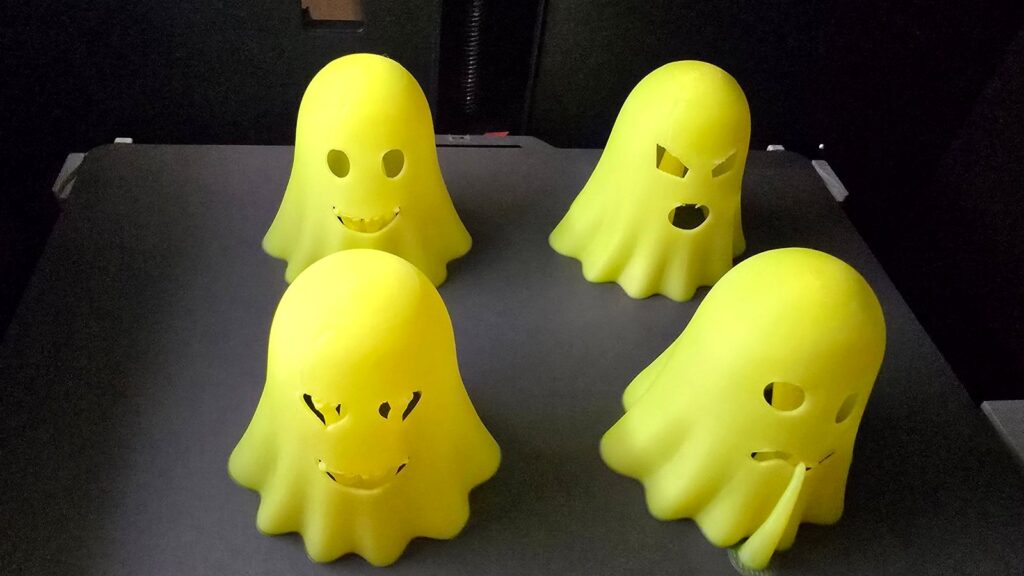
Our print: we printed six of the ghosts in SUNLU Glow in the Dark PLA (Glow Yellow, 1.75 mm). The six took 2 hours 45 minutes and used 59 g of filament, about 10 g a ghost. That includes supports, which we suspect the ghosts do not need. The supports added time and filament, and they left a few rough edges inside the eye and mouth holes, plus the leftover piece you can see at one ghost’s mouth in the photo. To work out what your own print will cost, use our 3D print cost calculator.
2. Shy Ghost
By Trisztan on Printables · 519 likes, 3,936 downloads · model page
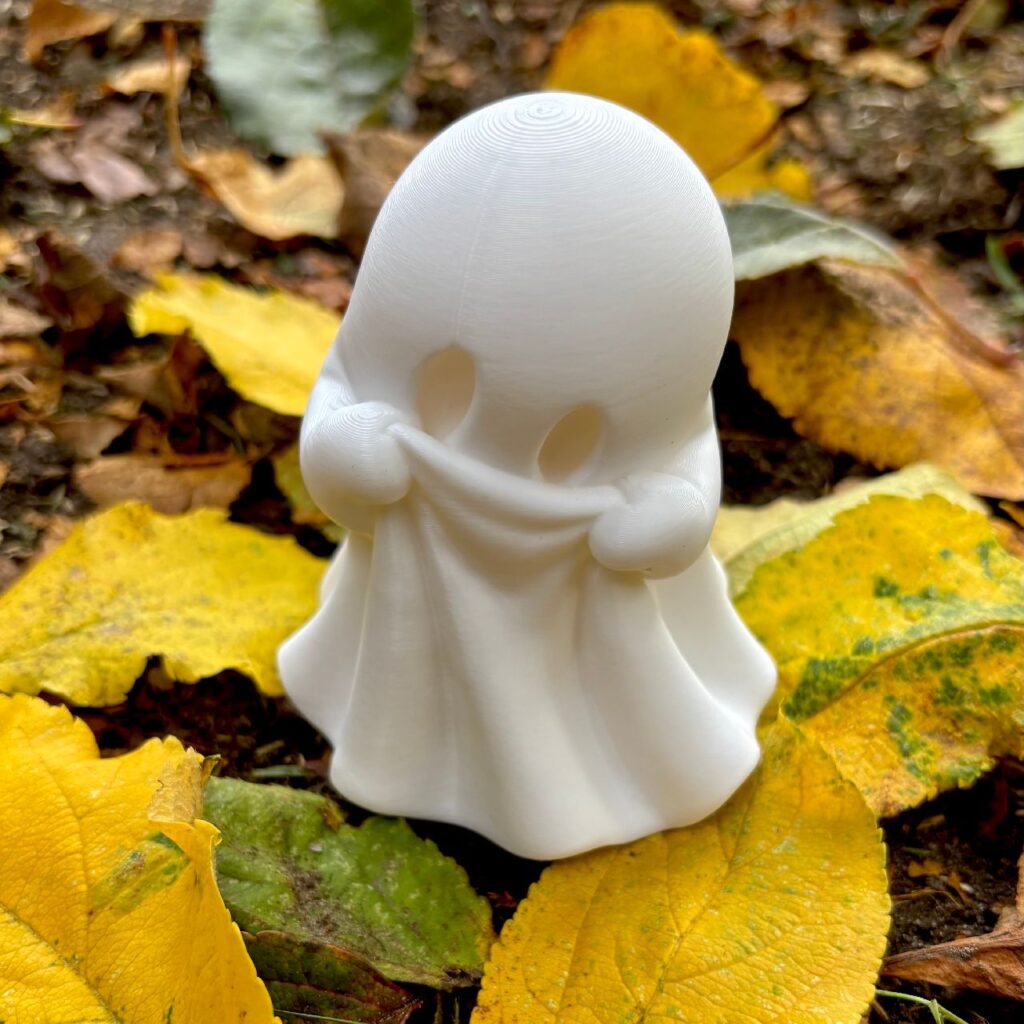
A small ghost holding its sheet up over its face, as if it would rather not be seen. It prints upright with no supports. The download is a ready-made Bambu Studio project for the A1 with a 0.4 mm nozzle: PLA, 0.2 mm layers, two walls and 15% infill. On another printer, check the sliced preview around the hands and the raised folds before you start.
What makers say: more than ten people have posted prints, and the reports are consistently good. One maker had no trouble with the overhangs and suggests putting the seam at the back of the head. Two others added a little support and said it cost almost nothing in time or filament. Another printed it at 150% in matte PLA with no infill and three walls. One commenter suggests glow-in-the-dark filament, which suits it well.
The licence is CC BY-NC-ND 4.0, so it is free for personal use. Ask the creator before you sell prints.
3. LEGO-style head lantern
By Spider753268 on Printables · 741 likes, 4,175 downloads · model page
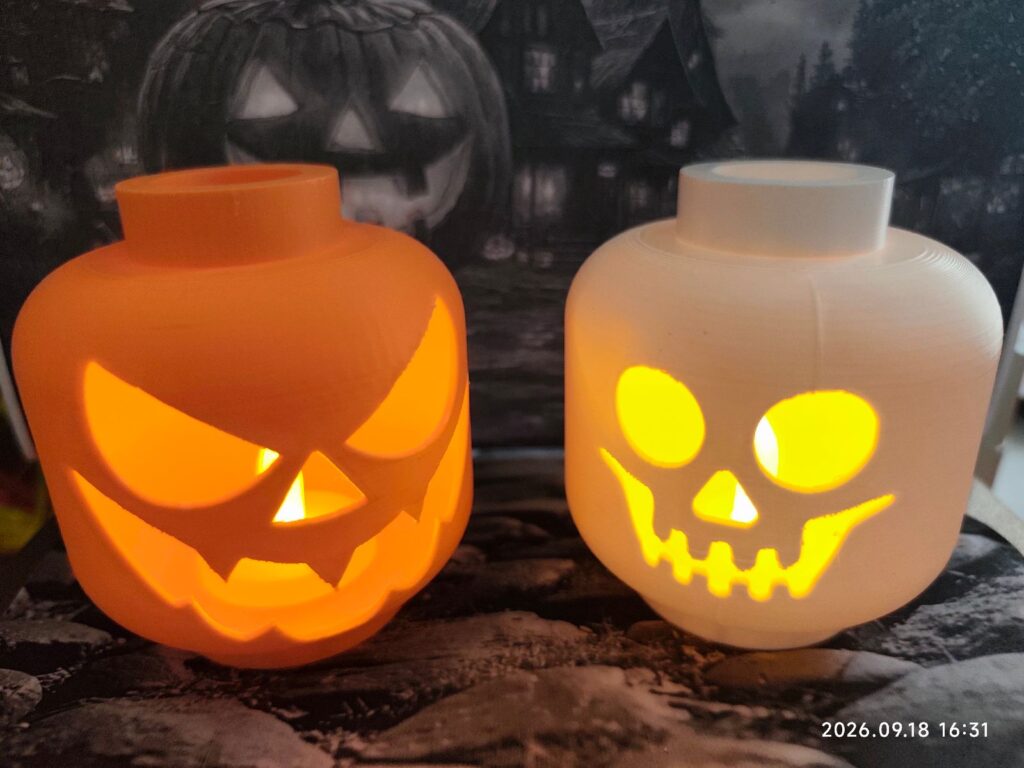
A Halloween lantern shaped like a classic minifigure head, with room inside for an LED candle. It is a fan design, not a LEGO product.
Safety: use an LED tealight, never a real candle. PLA starts to soften at around 60°C, and a flame inside a plastic lantern is a fire risk.
What makers say: five makes are posted, mostly as photos. The one written report came from a beginner whose first supported print it was: the top teeth gave trouble, but it still looked good as a decoration. Use supports under the teeth and check them in the slicer preview.
4. Tiny glowing jack-o’-lantern
By DIY Wizard on MakerWorld · in MakerWorld’s Halloween 2026 collection · model page
A pumpkin small enough to wear as an earring, with a tiny LED inside. It also works as a keyring or a decoration. The creator’s profile prints it in about 1.2 hours on two plates (orange and green), with tree supports for the mouth. It first appeared last year and is back in MakerWorld’s collection for 2026.
The light is a small LED module with a magnetic switch: part KC015 in warm white, or KC006 in red. You turn it on and off with a magnet rather than a button, which is how it fits in something this small. The LED is about 7.5 mm across and the hole is 8.5 mm. If yours is a tight fit, the creator suggests printing both parts at 105%.
Safety: lights this small usually run on button cells. Keep finished pieces and spare cells away from small children, because a swallowed button cell can cause serious injury.
The licence is MakerWorld’s Standard Digital File Licence, which means personal use only and no selling prints.
What makers say: 281 reviews and ratings, averaging 4.9 stars on the main print profile (107 ratings) and 4.7 on the earring profile (18 ratings). That is one of the strongest records in this list.
5. Halloween Jack-O’-Lantern by Bambu Lab
By Bambu Lab on MakerWorld · model page
The biggest Halloween project in this list. You get two lantern designs and three caps with different cut-outs: a skull, a spider and a bat. The lamp base clips on and off, and when you fit it on top it becomes a carrying handle.
Bambu Lab’s own print profile takes about 13.5 hours over three plates. There is also a profile for translucent PETG (ad), which takes about 26.6 hours. If you want it ready for the 31st, start it this weekend.
What makers say: 230 reviews and ratings, with the main profile averaging 4.9 stars from 206 ratings. Four people have also published their own remixes. It is designed for Bambu Lab’s LED Lamp Kit.
Useful prints
6. USB-C and device port cleaning tool
By yukiLo_3d on Printables · 1,074 likes, 6,549 downloads · model page
The most downloaded model on Printables’ trending list when I checked. It is a slim, flat tool with a hook at one end for pulling lint out of USB-C and Lightning ports, and a fine point at the other end for headphone sockets and speaker grilles.
Why plastic and not metal: the usual advice is not to clean a port with a pin or a paperclip. Metal can bridge the contacts inside the port and short them, or scratch the plating. Plastic does not conduct, so a printed tool is the safer choice. Even so, switch the device off and unplug it first.
Print note: the creator recommends PETG (ad), ABS or ASA rather than PLA. PLA is stiff but brittle, so a thin hook made from it can snap when you pull. Print it flat with 100% infill, or four to five walls, so the tips are solid plastic. Layers of 0.16 to 0.18 mm keep the hook sharp. No supports are needed.
What makers say: this has the most makes in the list, with more than ten posted and 31 reviews. Two makers printed it in PETG and report that it works well; one went to 0.12 mm layers for extra detail. One maker found theirs came out slightly too big and had to trim it, so print one and test the fit before printing a batch.
7. Swing-out under-desk keyboard tray
By ArtSuzhou on Printables · 940 likes, 1,127 downloads · model page
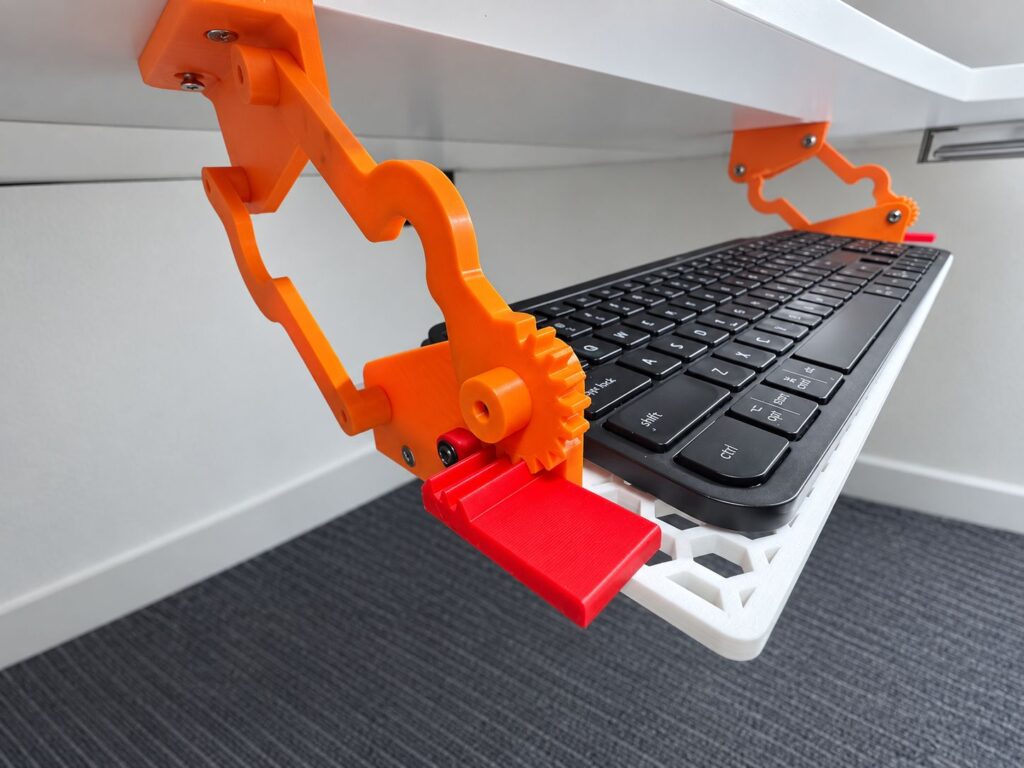
A pair of linked arms that mount under the desk and swing the keyboard out and towards you in an arc, then fold it away underneath. The creator designed it for people who find it hard to reach a keyboard on top of a desk, for example because of limited arm or shoulder movement, chronic pain or a wheelchair seating position. It also suits anyone who is short of desk space. It was an entry in Printables’ Logitech MX keyboard add-ons contest.
There are two sizes. The full-size tray is 462 or 480 mm wide and comes in two halves, so it fits a 250 mm bed. The short tray is 300 mm for compact keyboards. Large release levers at the front lock and unlock the arms, and mounting templates help you mark the screw holes.
The hardware is a handful of screws and a small spring for each side. The creator puts the total cost at under $10.
Print note: tighten the pivot screws only until the wobble goes. Printed arms that are clamped tightly together will bind instead of turning.
What makers say: nobody has posted a finished tray yet, so treat it as untested. One maker has printed adapters for a wooden tray instead. The creator says it is steady for normal typing but can shift under heavy downward pressure. Each half of the tray takes about 5 hours, and the right half needs supports.
8. Heavy-duty wall hook
By 3DtoD on Printables · 686 likes, 1,902 downloads · model page
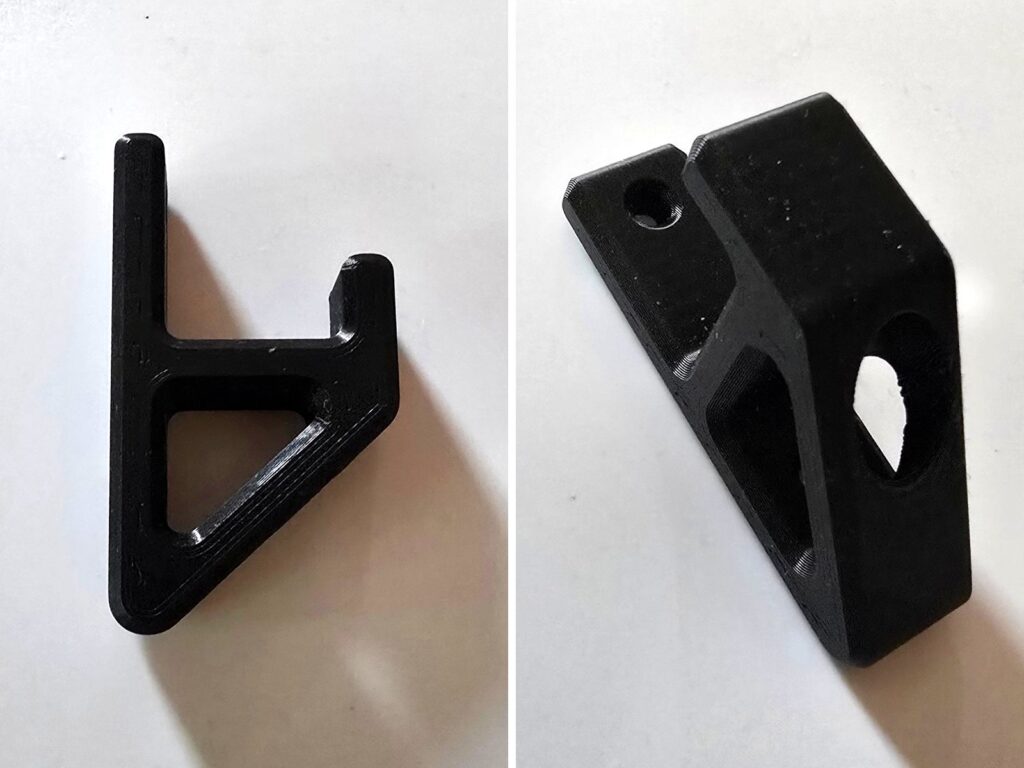
A 57 mm tall hook with a diagonal brace, for tools, cables and bags.
Why you print it on its side: a 3D print is weakest between its layers, because each layer is only fused to the one below it. Printed standing up, the weight on the hook would try to pull the layers apart. Printed on its side, the layers run along the hook, so the load is carried along each layer instead of across the joins. The creator also suggests three or four walls and 20 to 30% gyroid or grid infill.
No load rating is given, so test it with something light before you trust it with anything heavy or fragile.
What makers say: four makes are posted, all without trouble. One printed it in ordinary PLA on a standard profile. Another used PETG at 25% infill, also printed a 120% version, and added three 8 mm magnets. Nobody has reported how much weight it holds yet.
9. FORMA Box storage system
By FORMAstudios on Printables · 683 likes, 1,728 downloads · model page
Stackable boxes in three sizes, with three insert layouts for each size. All the sizes stack on each other, so you can mix them on a desk, a shelf or a workbench. On an electronics bench, the small box with a divided insert makes a good home for resistors, header pins and spare screws.
It is free to print for yourself. Selling prints needs a commercial licence, which the creator sells through a paid membership.
What makers say: three makes are posted, and one maker says the prints came out well. Nobody reports problems with fit or stacking. One commenter asked for the box measurements, which are not listed on the page, so check the size in your slicer before you print.
For the electronics bench
10. MDU-12 modular cyberdeck
By Jankbu on Printables · 519 likes · an award winner in Printables’ Framework Laptop 12 Mainboard Re-Use contest (174 entries, September 2026) · model page
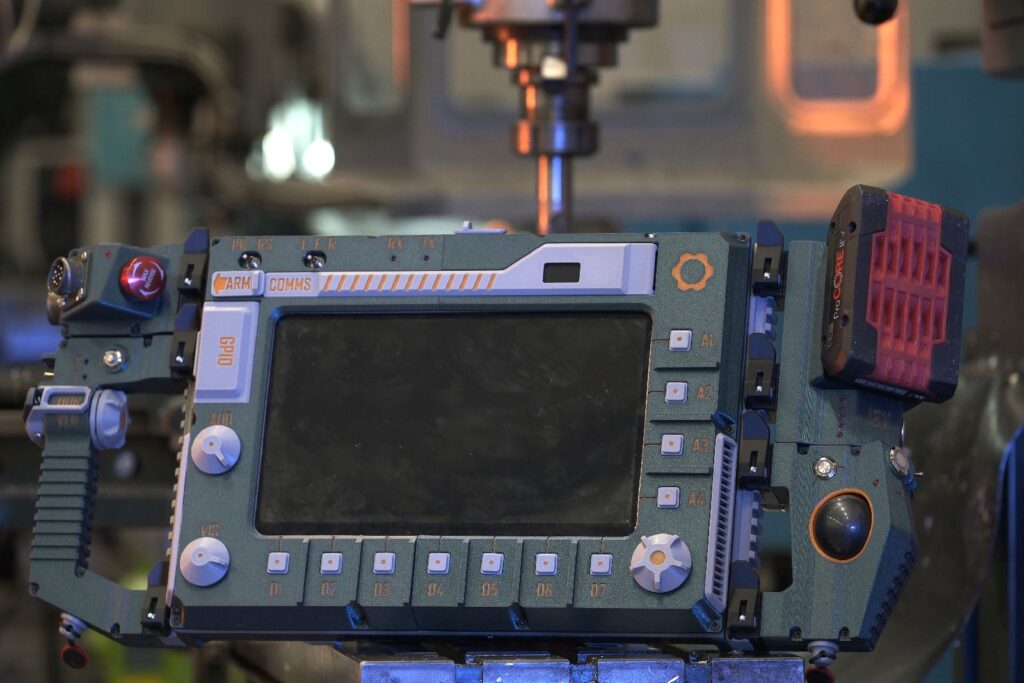
A portable computer built around the mainboard from a Framework Laptop 12. It has a sliding screen inspired by the Sony VAIO UX and swappable modules that clip onto rails. The creator admits it is heavy and less practical than a laptop. That is the point: it is meant to feel like a machine from a 1990s science-fiction film, where every button press matters.
How it is put together:
- Power: a Bosch 18 V power-tool battery feeds a converter board that turns it into USB-C Power Delivery for the mainboard.
- Controls: Raspberry Pi Pico boards read the buttons, toggle switches and rotary encoders on the screen bezel, the handle and the connection module.
- Modules: a trackball module built around a Logitech Trackman Marble, a handle with a large scroll wheel, and a connection module with a big red button that closes the active window.
- Screen and radio: a 10.1-inch IPS touch screen, with a LoRa radio module in the bezel.
One detail stood out. The creator did not own a Framework Laptop 12 mainboard while designing it. The fit was worked out from Framework’s published CAD files and checked against a 3D-printed copy of the board.
This is a big project, with 96 files and a long parts list on the model page. If you have a spare Pico, though, the bezel is a good idea to borrow on its own: a few buttons and a rotary encoder wired to a Pico make a useful USB control pad for any computer.
What makers say: no makes yet. The ten comments are admiration and questions, many from people who saw it in a YouTube video. It is here as an idea to borrow from, not as a tested build.
Before you print
- Free to download is not the same as free to sell. Most of these models are for personal use only. Shy Ghost is CC BY-NC-ND 4.0, the tiny jack-o’-lantern uses MakerWorld’s Standard Digital File Licence, and the FORMA Box needs a paid licence before you sell prints. Check the licence on the model page before you sell anything.
- Check what a real print looks like. More creators now use AI-made images on their model pages. Some say so and some do not. The Makes tab on Printables, and the photo reviews on MakerWorld, show prints from people who actually made the model. They are the best guide to how it will come out.
- Post your make. If you print one of these, add a photo to the model page. It helps the creator, and it helps the next person decide.
Next month’s list goes up in early November and starts on Christmas prints, because the bigger ones need a few weekends. If you have seen a model that should be in it, send it in through the contact page.