
Free Christmas 3D prints: 10 of the best for 2026
Ten free Christmas 3D prints for 2026, from vase-mode baubles to a nativity kit card and a toy workshop, with print tips and what makers report.
Christmas Day is on a Friday this year. From early November, that leaves about seven weeks to print decorations, cards and presents, which is enough time for a big project if you start soon.
These are ten free models worth printing now. Most of them have dozens or hundreds of makes from other people, so you can see how each one turns out before you start. Each pick comes with a note on how to print it well and why that works, plus what the people who printed it report.
I chose them from Printables’ Winter and Christmas category, Printables search and MakerWorld, checked on 27 October 2026. New Christmas models for 2026 are only starting to appear, and none of the new ones I checked had more than one make, so the picks are designs from the last few years that many people have already printed. I left out anything based on film, TV or game characters or on brand logos, and anything with an unclear licence. Every model here is free to download, and the like, download and make counts are as they stood on 27 October 2026.
| Pick | Where | What you need besides filament |
|---|---|---|
| 1. Christmas Tree Ornament Set (vase mode) | Printables | Ornament caps, ribbon or twine |
| 2. 8 snowflakes to hang (Pack N° 3) | Printables | Thread or ribbon |
| 3. Christmas Tree Set | Printables | Nothing |
| 4. Christmas Tree Tealight | Printables | A bright LED tealight or an LED strip |
| 5. Christmas Town, simple hollow buildings | Printables | A string of LED fairy lights |
| 6. Nativity Scene Kit Card | Printables | Nothing (a little glue if the fit is loose) |
| 7. Christmas Gift Bow, foldable | Printables | Glue or tape to fix it to the present |
| 8. Gift Factory, the Christmas toy workshop | MakerWorld | Bambu Lab’s Maker’s Beginner Kit for the moving parts |
| 9. Christmas Cookie Cutter set | Printables | Nothing |
| 10. Christmas tree hooks | Printables | Nothing |
Decorations and ornaments
1. Christmas Tree Ornament Set (Vase Mode Prints)
By Popandsicle on Printables · 10,446 likes, 38,539 downloads, 685 makes · licence CC BY-NC-SA 4.0 · model page
Six bauble designs made for vase mode, and the most-made model in this list. The creator designed them to be light, so a tree full of them does not weigh the branches down. They are sized for a full-size tree, and the creator suggests printing them at two-thirds size for a small one.
Why vase mode works: in vase mode (PrusaSlicer and Bambu Studio call it spiral vase), the printer draws a single wall as one continuous spiral, rising a little on every turn. There is no infill, no top and no seam, so each bauble prints quickly and weighs very little. The weak point is that one thin wall is fragile, so the creator changes one setting: the line width (PrusaSlicer calls it extrusion width) goes up from 0.4 mm to 0.6 mm. A wider line makes a thicker wall, and each line overlaps more with the one below it on the steep curves, so the bauble is less likely to crack.
Finishing: snap the top off each bauble with pliers. It should break cleanly along a layer line. Leave enough of the neck to take an ornament cap: the creator uses caps of about 19 mm (¾ inch) for the full-size baubles and about 13 mm (½ inch) for the small ones. Ribbon or twine also works.
What makers say: 685 makes, and 4.9 stars from 555 ratings. The most common change is the size: one maker found the full size too big for a 180 cm tree and printed them at 50% and 60%, and others used 63% and 75%. Dual-colour and three-colour silk PLA are the most popular choice, because the colour shifts as the bauble turns. One maker printed them in clear PETG with fuzzy skin on the walls for a textured glass look, and some makers used printed caps from other models on Printables instead of bought ones.
2. 8 snowflakes to hang (Pack N° 3)
By JT3D on Printables · 1,140 likes, 5,498 downloads, 19 makes · licence CC BY 4.0 · model page
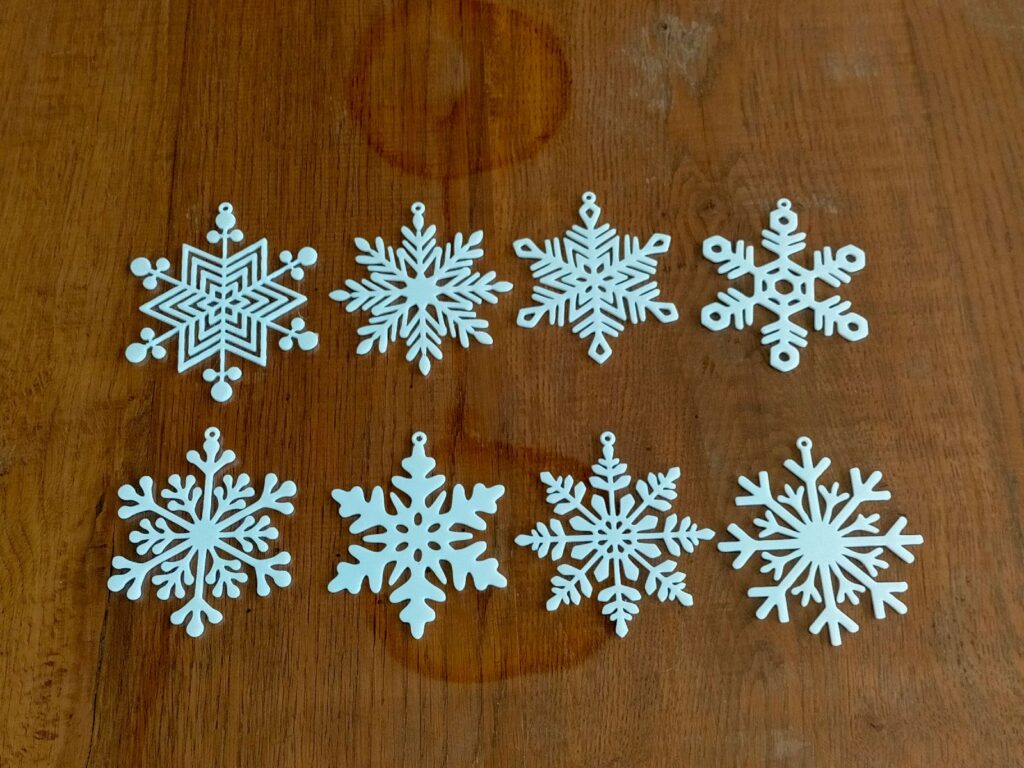
Eight flat snowflakes to hang, each 9 cm across and 2 mm thick. It is the third of six snowflake packs from the same creator, so you can build up a larger set. The model page lists about 3 hours 26 minutes and 46 g of filament for the print file supplied.
Print note: a flat snowflake is one of the easiest prints you can make. If the first layer goes down evenly, the rest of the print will usually be fine, and a flat part is strong in the direction that matters (see the tip on hanging loops below). The download includes the creator’s own slicer settings. One maker found that opening the file changed their PrusaSlicer settings, so check the settings before you print.
What makers say: 19 makes, and 5.0 stars from 17 ratings. Makers describe it as quick and easy to print, and one printed a large number to decorate their house. One scaled it up to 200%, one used a 0.6 mm nozzle with white PLA, and one suggests glow-in-the-dark filament. Glow filament wears away brass nozzles, as we explained in October’s list of free 3D prints, so fit a hardened steel nozzle if you print a large batch.
3. Christmas Tree Set
By JamesThePrinter on Printables · 3,136 likes, 11,616 downloads, 134 makes · licence CC0 (public domain) · model page
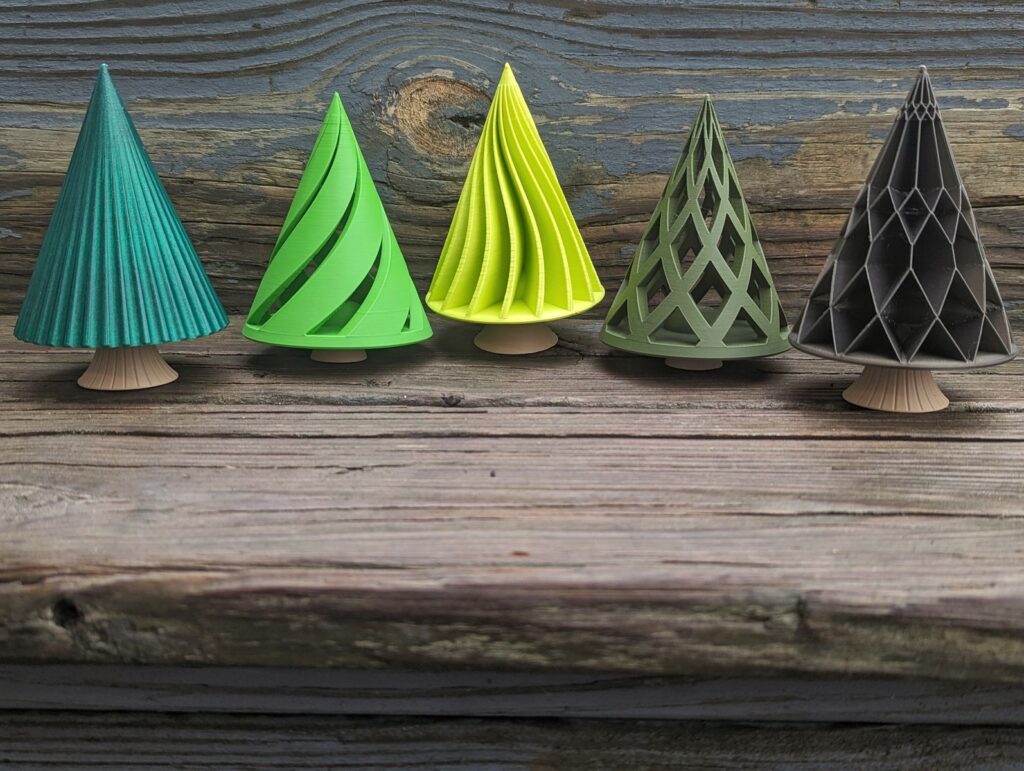
Five small trees and three trunks that screw together, so any tree fits on any trunk. The trees have different patterns: spiral, lattice, scalloped, wavy and diamond. The trunks are short, tall, and tall with a texture. The creator’s photos use matte brown PLA for every trunk and a different green for each tree.
Print note: the creator gives settings for almost every piece, and each one has a reason.
- Use 25% infill in the base and the threaded centre of each tree. The extra plastic low down adds weight, so the tree stands steady on its trunk.
- Use 0% infill for the rest of the scalloped, wavy and diamond trees. A hollow upper part prints faster and keeps the weight at the bottom.
- For the spiral tree, move the seam (the point where each layer starts and ends) to the back of each spiral by hand in the slicer. The creator found that this reduces curling at the leading edge of the spiral.
- For the wavy tree, change the perimeter generator to Classic. The default, Arachne, leaves some unwanted edges on this shape.
What makers say: 134 makes, and 4.9 stars from 116 ratings. Makers have printed the trees at sizes from 60% to 125% and grouped them into a small forest. Ideas include fuzzy skin on the top part, marble PETG, and wood-fill filament for the trunks. One maker suggests them as small presents, and another maker’s colleagues asked for more. One maker could not get the tip of the lattice tree to come out cleanly in the slicer, but had no other problems.
4. Christmas Tree Tealight
By ChrisTheViolaNerd on Printables · 1,740 likes, 9,326 downloads, 43 makes · licence CC BY-SA 4.0 · model page
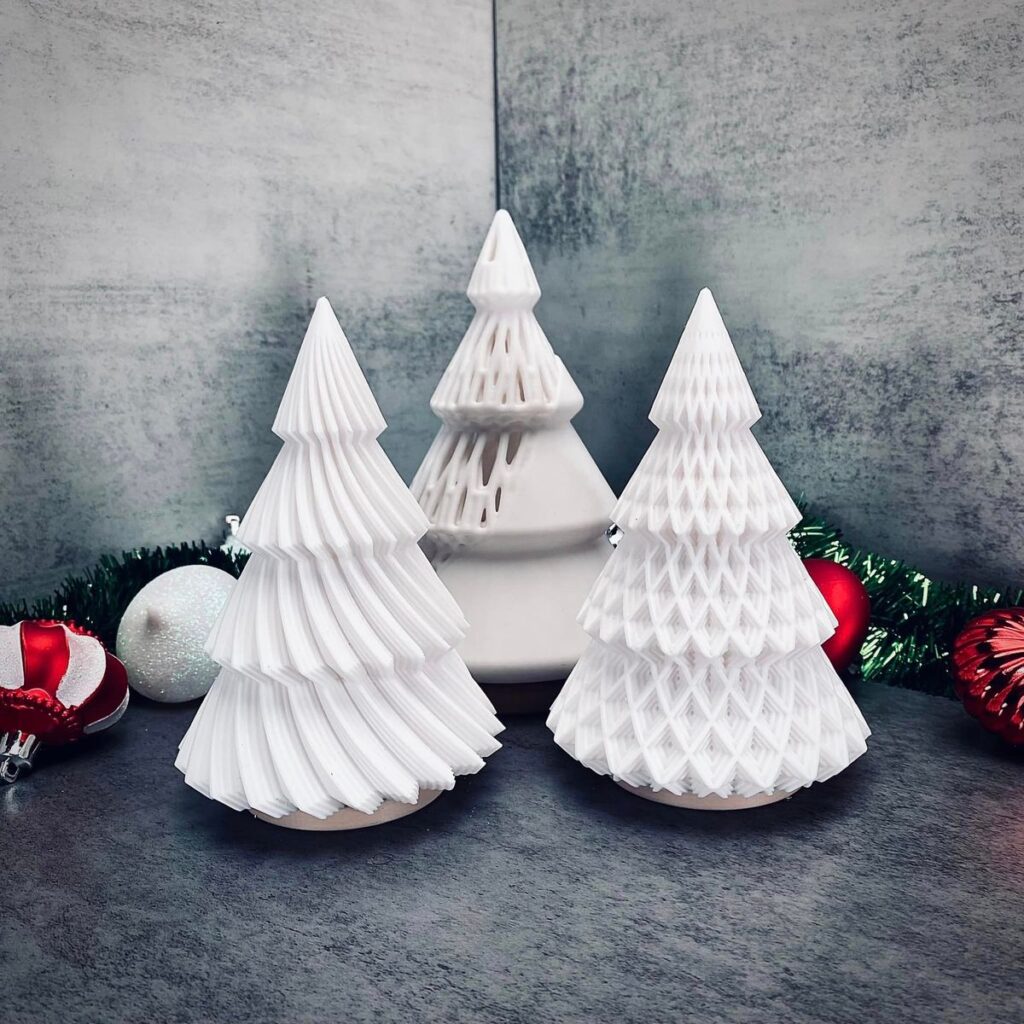
Tree-shaped tealight holders in two sizes, with two tree designs and a base for each size, plus a separate tree lamp file. It was an entry in Printables’ Winter Holidays Decorations contest in 2024. The creator printed every part with 2 walls, 5% infill and 0.2 mm layers.
Safety: use an LED tealight, never a real candle. PLA softens and starts to deform above about 60 °C, and a flame inside a plastic holder is a fire risk. If your LED tealights run on coin cells, keep the tealights and any spare cells away from small children. A coin cell that gets stuck in a child’s food pipe can burn a hole in it, and the government’s advice is to go straight to A&E or call 999 if you think a child has swallowed one.
Why the light is the hard part: every wall and every line of infill blocks some of the light. A standard LED tealight is quite dim, and makers found that it does not shine through very well. That is why makers suggest translucent or clear filament, fewer walls (one suggests a single wall) and a brighter light.
What makers say: 43 makes, and 4.8 stars from 39 ratings. Makers say that you need a bright light: one put an LED strip inside, which worked well, and another cut a larger hole in the base to fit a bigger light. Clear and transparent PLA look good when lit, and one maker plans to try PETG to let more light through. The trees use a fair amount of filament, and one maker printed a smaller version in glitter filament for that reason. Reported print times were 6 hours 39 minutes in ABS with a 0.6 mm nozzle, and 10 hours on a Creality K1 Max. A phone torch is a quick way to test the effect before you buy lights.
Village and nativity
5. Christmas Town, Simple hollow Buildings
By Mr.(Pr)interesting on Printables · 1,802 likes, 6,325 downloads, 22 makes · licence CC BY 4.0 · model page
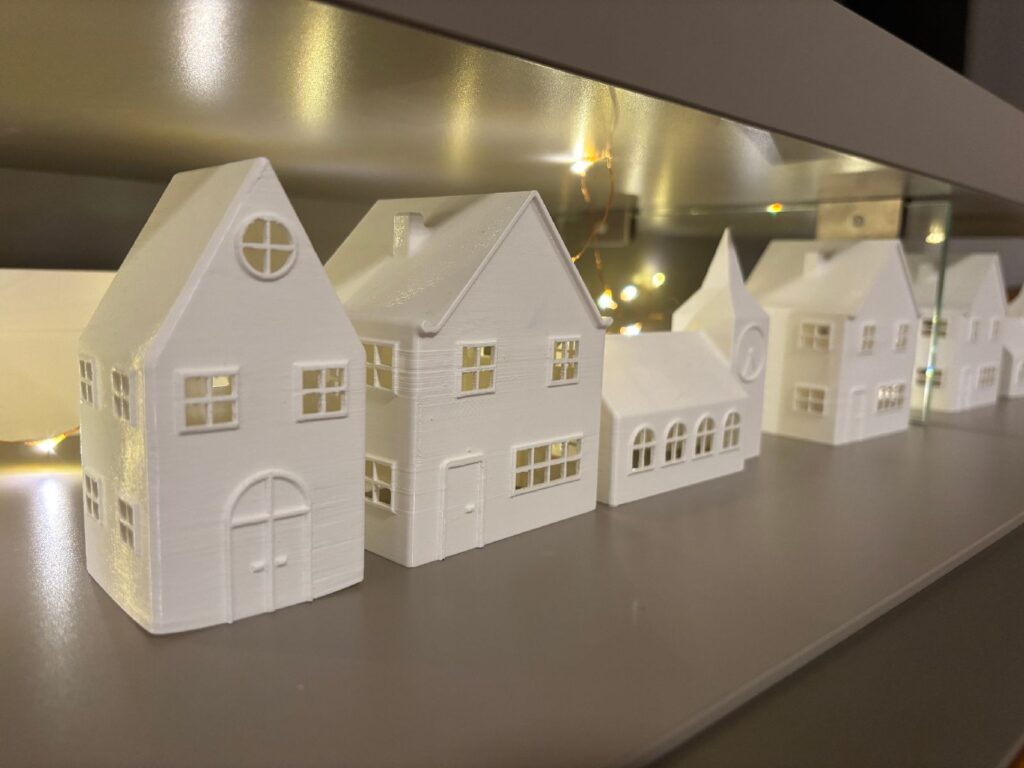
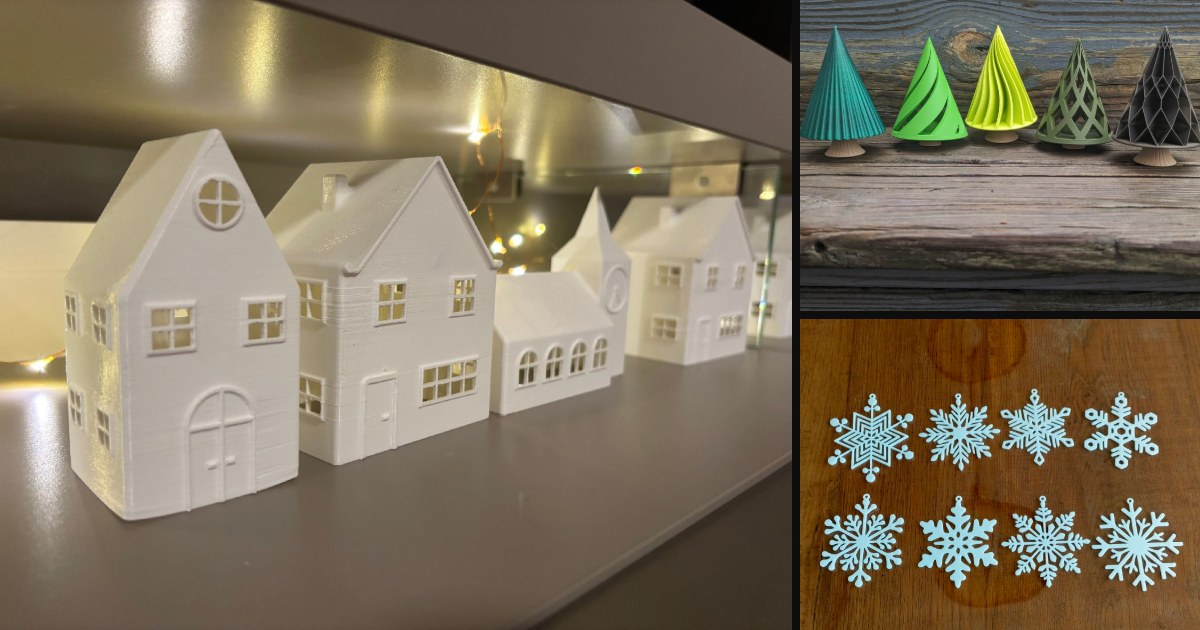
Three hollow buildings for a small Christmas village. They are open inside so that light can shine out of the windows, and the creator displays them in the living room with a string of lights. The creator gives no print settings.
Print note: makers printed the houses without supports, even though the windows leave overhangs. A window opening is a short bridge: the printer pulls the filament straight across the gap, and over a short distance it does not sag much before it cools.
Lights: a string of LED fairy lights threaded behind or through the houses is the simplest way to light them. If you would rather wire your own LEDs, our LED resistor calculator works out the resistor that each LED needs.
What makers say: 22 makes, and 4.9 stars from 23 ratings. One maker describes it as a quick and easy print. One printed it in PETG without supports, one in wood-fill PLA, and one scaled it up to 177% with 2 walls and 10% infill. One maker added the houses to Secret Santa presents. Another noticed that the clocks on the buildings all show different times.
6. Nativity Scene Kit Card
By Nakozen on Printables · 950 likes, 3,609 downloads, 75 makes · licence CC BY-NC 4.0 · model page
A nativity scene that prints flat in a frame, like a model kit. You snap the pieces out and push them together to make a small standing scene, which can hang on the tree or stand on a mantelpiece. One version of the frame reads “Nativity Scene” and the other “Merry Christmas”, and there are versions without the frame.
Print note: the creator’s settings matter here, because the pieces push together and the fit depends on them. Print it with 0.2 mm layers (the creator says finer layers do not help and can change the fit) and 100% infill, so that it hangs straight. The design also has a colour change built in: pause the print after layer 9 and change the filament, and the final three layers come out in a second colour. Most slicers let you add a pause or a colour change at a chosen layer, so this works on a printer with a single nozzle.
If the pieces are loose on your printer, there is a tighter-fitting set (its file names start with “Ti_”). For an even tighter fit, the creator suggests increasing the height (the Z scale) by 15%.
What makers say: 75 makes, and 5.0 stars from 45 ratings. Check the fit carefully, because it varies from printer to printer. One maker found both versions too loose, so the figures fell out. Another had to shave the pegs on the tight version, and a third made the holes in the floor about 0.5 mm smaller. Take care when you lift it off the bed, because one maker found that the connectors break easily. One printed it in silk white PLA in 1 hour 11 minutes on a Prusa MK3S+. Makers have used them to fill Christmas cards and as small presents with a gift card, and one family built them with the children at the dinner table.
Gifts and a big project
7. Christmas Gift Bow – Foldable!
By Bjørn Frihagen on Printables · 3,113 likes, 11,523 downloads, 291 makes · licence CC BY-NC-SA 4.0 · model page
A bow for a present that prints flat. You bend the printed ribbons into loops and press them onto a peg in the middle, and the tight fit holds the bow together without glue. Glue or tape fixes it to the parcel. The standard bow weighs about 5 g and a smaller version about 3.4 g, so it is a good way to use the end of a spool. The download has three versions: one with a stronger peg, one with rounded corners, and the smaller one.
Print note: the ribbons have to bend without cracking, so the filament matters. The creator has used ordinary PLA, PLA+ and high-speed PLA, but warns that silk, matte and other special PLAs may be too brittle to bend. For the top and bottom layers, the creator suggests the concentric pattern, so that the printed lines follow the ribbon instead of running across the bend, and more walls for strength. If the ribbons are too tight or too loose on the peg, adjust the X-Y hole compensation setting in your slicer.
Why warmth helps: PLA starts to soften above about 60 °C. A warm ribbon bends into a loop instead of cracking, and it keeps its new shape when it cools.
What makers say: 291 makes, and 4.9 stars from 234 ratings. The most common tip is to warm each ribbon before you bend it, with a hair dryer or on the warm print bed. One maker who printed bows in both PETG and PLA found that the PETG bends more easily, but another found that PETG still snaps unless it is warm. Several makers broke a ribbon or a whole bow while bending it, so bend each one gently. One found that the concentric pattern made the top ribbon snap and that the default pattern worked better, so print one bow before you print a batch. Another suggests fitting the top loop last, so that it locks the others in place, and one added a name with PrusaSlicer’s text tool.
8. Gift Factory – The Christmas Gift Factory
By Savy_Maker on MakerWorld · 331 reviews and ratings · MakerWorld’s Standard Digital File Licence · model page
The big project in this list: an elves’ toy workshop with moving parts. A present rides along a conveyor belt, slides down a chute onto a second belt and comes out at the front, while a pyramid of presents in the shape of a Christmas tree turns in the middle. MakerWorld lists it as a winner in its Master Challenge for conveyor belt designs.
The moving parts need Bambu Lab’s Maker’s Beginner Kit (ZC002), which supplies the motor that drives all three movements, and the designer says no screws are needed. LED tealights inside the houses, and a separate light-up “Merry Christmas” sign, are optional. You can also build it as a model that does not move, without the kit, and leave out the first plate. The designer provides a PDF assembly guide and videos, and says to use glue only where the guide shows, so that you can still reach the gears later.
Start it early: the standard print profile takes 63.1 hours over 14 plates, and the profile for the Bambu Lab A1 mini takes 69.6 hours over 24 plates. The light-up sign is a separate profile of 2.4 hours. To see what that much printing costs in electricity and filament, use our 3D print cost calculator.
What makers say: MakerWorld shows 331 reviews and ratings. The standard profile has 5.0 stars from 50 ratings, the A1 mini profile 4.8 from 6, and the sign 5.0 from 14. The individual reviews would not load when I checked, so read them on the model page before you start more than 60 hours of printing.
Practical festive prints
9. Christmas Cookie Cutter
By Best_codes on Printables · 980 likes, 10,138 downloads, 74 makes · licence CC BY 4.0 · model page
Seven Christmas cookie cutters: a candy cane, a Christmas tree, a gingerbread man, a mitten, a reindeer, a snowflake and a snowman, plus one file with all seven together. The creator recommends PLA, or PLA+ if you have it, printed at full size. If the walls come out thin or stringy on your printer, scale the cutters up slightly.
Food safety: a cookie cutter only touches the dough for a moment, and Prusa’s guide to food-safe printing treats it as a use that is possibly acceptable, with some care.
- The grooves between layers trap dough, and bacteria can grow in them. Washing does not make a print food-safe, so Prusa suggests replacing a printed cutter after some use.
- Wash the cutters by hand, not in the dishwasher. PLA softens above about 60 °C and can warp.
- A brass nozzle wears down, and the worn metal ends up in the print, so Prusa does not consider brass food-safe. If you often print things that touch food, a stainless steel nozzle is the better choice.
- Do not use a print as a container for food.
What makers say: 74 makes, and 5.0 stars from 62 ratings. Makers printed them in both PLA and PETG, some at 100% infill and some with a 0.6 mm nozzle. One printed theirs in about 50 minutes. One maker was worried that they would be flimsy, but found them very strong, and their children love them. Another found that the reindeer’s narrow shape holds on to the dough, so press it out gently.
10. Christmas tree hooks
By BrunoCRO on Printables · 629 likes, 2,701 downloads, 49 makes · licence CC0 (public domain) · model page
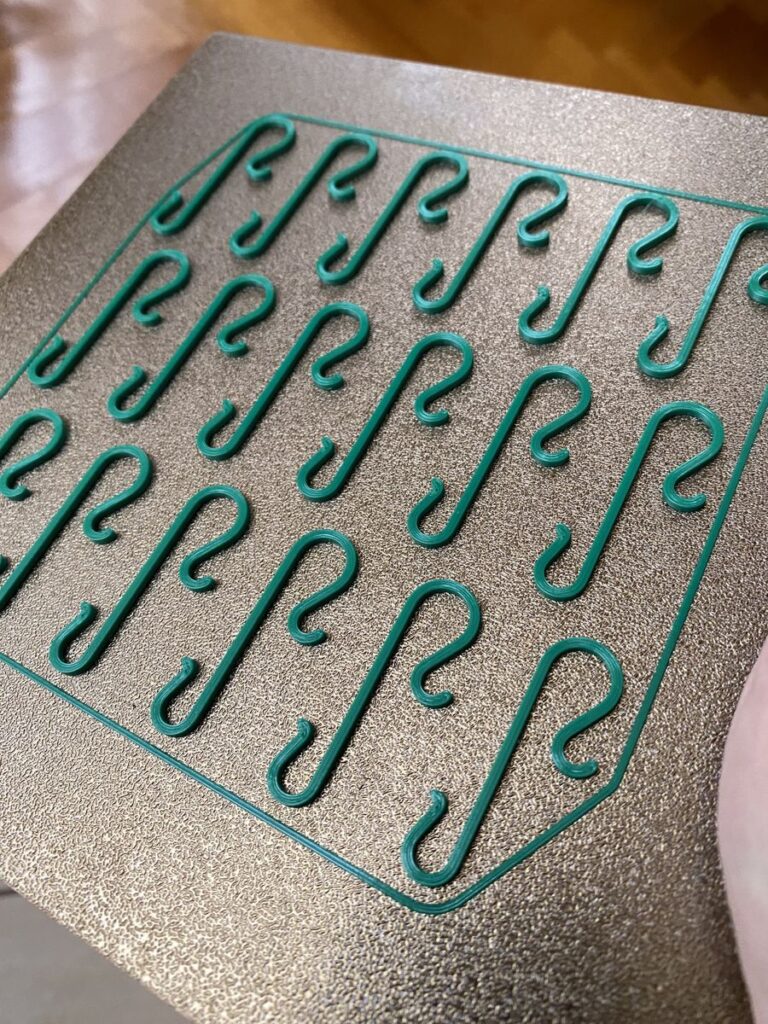
Printed hooks for hanging baubles on the tree, which are useful when the old wire hooks have gone missing. The creator describes them as quick to print and set up for a 0.4 mm nozzle. The model page lists about 38 minutes and 11 g of filament for the print file supplied, and there is a STEP file if you want to change the shape in a CAD program.
Print note: use PETG if you have it. PLA is stiff and brittle, so a thin hook can snap when you bend it over a branch. PETG is tougher and more flexible, which is what a hook needs.
What makers say: 49 makes, and 5.0 stars from 40 ratings. Makers call them fast and easy, and several used PETG for the extra flexibility. One maker made them wider so that they last longer, and found that the thin ones still work. Another found that the ball end did not grip tightly enough to stop baubles slipping off, so check the fit on your own baubles. Others have used them to repair baubles with broken hangers and to use up the last metre or two of a spool.
Tips for Christmas prints
- Silk and multicolour PLA. Silk PLA has a shiny finish. Dual-colour and three-colour silk PLA have two or three colours side by side in one strand, so the colour changes as you walk round the print, and you get a multicolour bauble from a printer with one nozzle. Makers used silk PLA on the vase-mode baubles and the nativity kit card. The gift bow’s creator warns that silk PLA may be too brittle to bend, so keep it for pieces that do not have to flex.
- A second colour with a single nozzle. Add a pause or a colour change at a chosen layer in your slicer, as the nativity kit card does after layer 9. The printer stops, you change the filament, and everything above that layer comes out in the new colour. It works best on flat prints with raised lettering or edges.
- Glitter and glow-in-the-dark filament. Glitter PLA looks best on a large flat surface, such as a snowflake or the front of a kit card, because more of the glitter faces you. Glow-in-the-dark filament wears brass nozzles (see pick 2).
- Hanging loops. Print loops lying flat, never standing up. In a flat loop, each line of plastic runs all the way round, so the weight of the decoration pulls along the lines. In an upright loop, the weight tries to pull the layers apart, and the joins between layers are where a print breaks first. Hang the decorations with ribbon, thread, ornament caps or the printed hooks in pick 10.
Before you print
- Free to download is not the same as free to sell. Six of these models have licences that also allow you to sell prints: the Christmas Tree Set and the tree hooks are CC0, which needs no credit, and the snowflakes, the Christmas Town, the cookie cutters (CC BY) and the tealight trees (CC BY-SA) need a credit to the creator. The other four are for personal use. The baubles and the gift bow are non-commercial, the nativity kit card’s creator sells a licence for selling prints through a Ko-fi membership, and the Gift Factory’s designer offers a membership for commercial use. Check the licence on the model page before you sell anything.
- Start the long prints now. The Gift Factory needs more than 60 hours of printing, and makers took between 6 and 10 hours to print the tealight trees.
- Check what a real print looks like. More creators now use AI-made images on their model pages. The makes on Printables and the photo reviews on MakerWorld show prints by people who actually made the model, so they are the best guide to how yours will come out.
- Use LED lights only in anything printed, and keep coin cells away from small children.
- Post your make. If you print one of these, add a photo to the model page. It helps the creator, and it helps the next person decide.
If you have printed a Christmas model that should be on this list, send it in through the contact page.
Frequently asked questions
Are these Christmas 3D prints really free?
Yes. All ten are free to download from Printables or MakerWorld. Six of them have licences that also allow you to sell prints, with a credit to the creator where the licence asks for one. The other four are for personal use unless the creator gives permission or sells a licence.
What is the easiest Christmas decoration to 3D print?
Flat snowflakes and the tree hooks. Each one is a single flat part with no supports, and if the first layer goes down well, the rest usually prints without trouble. Vase-mode baubles are almost as easy once spiral vase mode is switched on in the slicer.
Can I put a real candle in a 3D-printed tealight holder?
No. PLA softens above about 60 °C, and a flame inside a plastic holder is a fire risk. Use an LED tealight instead.
Sources: all checked on 27 October 2026: Printables’ Winter and Christmas category (trending over the past 30 days) and Printables search, each model page linked above with its makes and comments, the Gift Factory page on MakerWorld, the Office for Product Safety and Standards’ button battery advice, Prusa’s guides to food-safe printing, PLA and PETG, and the Creative Commons pages for CC BY, CC BY-SA and CC0.