
AI tools for makers: what is new in November 2026
Gemini 4 Carbon and GPT-6.1 Terra, a price change on 1 December, the free AI plans for code and projects, and what to check before you trust an answer.
Two new models arrived in the last four weeks, one model’s price doubles on 1 December, and the free options for help with code and projects have not changed much. Google announced Gemini 4 Carbon on 28 October, but most people cannot use it yet. OpenAI released GPT-6.1 Terra on 26 October. If you only want a free helper for an Arduino sketch or a Pico project, the free plans in the table below are still enough.
Facts in this article were checked on 9 November 2026. It follows the October edition, which still has the image-to-3D comparison and the circuit-board and print-monitoring tools. AI services change often, so a new edition appears each month.
What is new since 14 October
- Gemini 4 Carbon (Google, announced 28 October). Google calls it its strongest model, especially for security work and long tasks. It is not generally available: at launch it went to a limited group of cyber security defenders, and Google says only that it will reach developers “as soon as possible”, according to The Register. The same report gives an introductory price of $2 per million input tokens and $10 per million output tokens, rising later to $4 and $20, with no date given. On Artificial Analysis’s leaderboard it now has the top score (60).
- GPT-6.1 Terra (OpenAI, 26 October). OpenAI’s changelog describes it as released for visual reasoning, computer use and writing. In the API it costs $1 per million input tokens and $5 per million output tokens, half the price of GPT-6.1 Sol. I could not confirm from OpenAI’s own pages which ChatGPT plans include it; ChatGPT’s plans page lists GPT-6 Luna, not Terra, for the free plan.
- GPT-Image 2.6 (OpenAI, 4 November). The changelog says it can produce SVG output and animated GIFs. SVG is a line-drawing format that laser cutters and vinyl cutters can read, so it could be useful for flat designs. Treat any shape as a draft: check dimensions and cut paths on screen before you cut anything.
- Gemini 4 Argon price rise on 1 December. Google’s price page says the current $2 and $10 per million tokens applies until 30 November, then doubles to $4 and $20. If you call Argon from your own scripts, check your costs before December.
- Older Gemini models are being retired. The same page says Gemini 2.5 Pro requests will go to Gemini 3.8 Flash from 1 December, and Gemini 2.5 Flash requests to Gemini 3.5 Flash-Lite. A script that names an old model will keep working but will get a different, usually smaller, model, so test it again.
How the models compare now
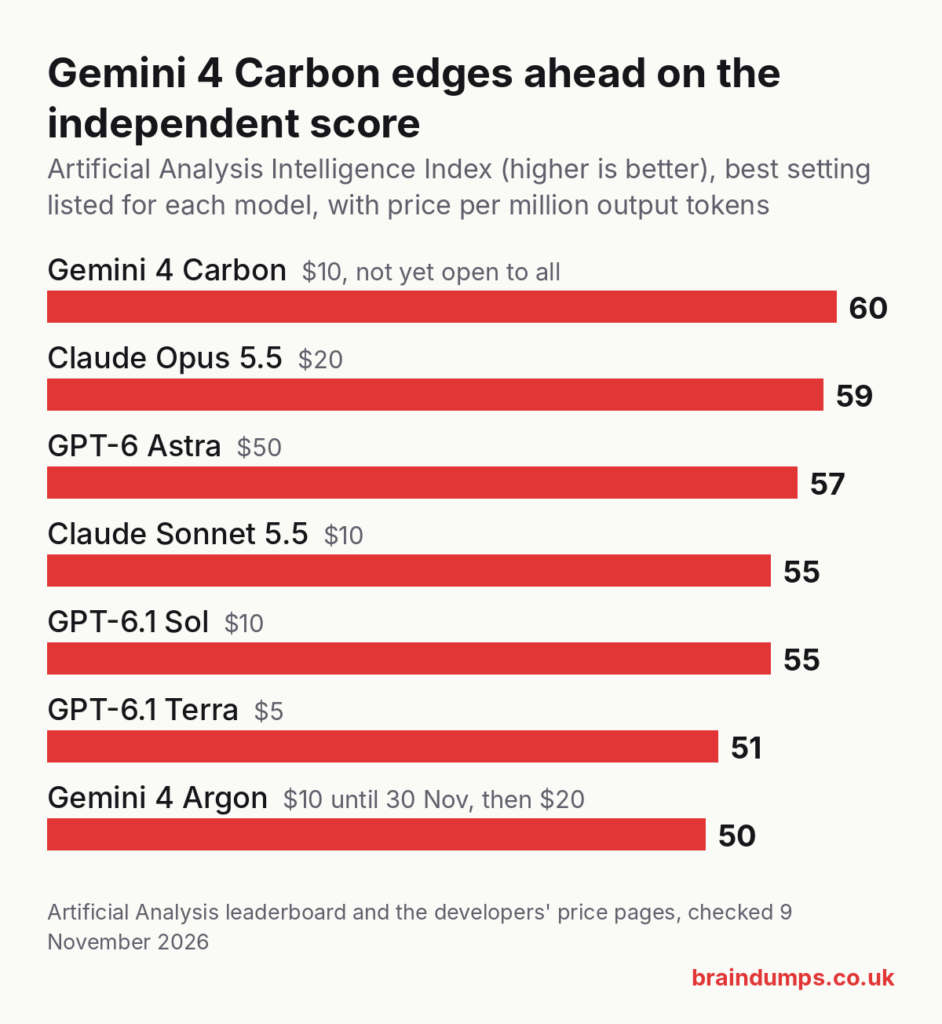
The score is the Artificial Analysis Intelligence Index: an independent combined score across many tests. Higher is better, and it is a guide rather than a verdict. I used the highest setting listed for each model on 9 November. The scores are not directly comparable with October’s, because several models appear at more than one effort setting and the leaderboard has changed since then. Prices are what developers pay per million tokens (roughly 750,000 words) going in and coming out.
| Model | Developer price (in / out) | Independent score | Can you use it now? |
|---|---|---|---|
| Gemini 4 Carbon (Google) | $2 / $10 at first, then $4 / $20 | 60 | Limited access only |
| Claude Opus 5.5 (Anthropic) | $4 / $20 | 59 | Yes, paid plans and the API |
| GPT-6 Astra (OpenAI) | $10 / $50 | 57 | Yes, not on the free plan |
| Claude Sonnet 5.5 (Anthropic) | $2 / $10 | 55 | Yes, including the free plan |
| GPT-6.1 Sol (OpenAI) | $2 / $10 | 55 | Yes, not on the free plan |
| GPT-6.1 Terra (OpenAI) | $1 / $5 | 51 | API; ChatGPT plan access not confirmed |
| Gemini 4 Argon (Google) | $2 / $10 until 30 November, then $4 / $20 | 50 | Paid plans and the API |
The top four are within five points of each other. For everyday help with code, circuits and project planning, you will not notice much difference between them, and price and limits matter more. Anthropic’s price page lists Opus 5.5 at $4 and $20 and Sonnet 5.5 at $2 and $10; OpenAI’s page lists the GPT-6 prices above.
Free AI help for code and projects
You do not need to pay to get useful help with an Arduino sketch, a Pico project or a small website. These are the free options, checked on the services’ own pages.
| Service | What the free plan gets you | Paid plan from |
|---|---|---|
| Claude (claude.ai) | Sonnet and Haiku models with usage limits every 5 hours and every week; Opus is not included | $17 a month if billed yearly ($200 up front), or $20 monthly |
| ChatGPT | GPT-6 Luna and GPT-5 Thinking Mini; text chats are listed as unlimited, but uploads, image creation, voice and Codex are limited | Price not shown on the page when checked |
| Gemini API (for your own scripts, in Google AI Studio) | No charge for Gemini 3.8 Flash, 3.6 Flash and 3.5 Flash-Lite; no free tier for Gemini 4 Argon | Google AI Pro $19.99 a month (US dollars; no pound price shown) |
| GitHub Copilot Free | 2,000 code suggestions a month in your editor, plus limited chat and agent use | $10 a month |
Prices are in US dollars because the services show them that way; your bank adds its own exchange rate and fee, and UK VAT may be added at checkout. I did not re-check the free allowance of the Gemini app, Grok or the Arduino Cloud assistant this month, so see October’s article for those.
Three practical points:
- Try two services and keep the one you like. Free limits change often, and the independent scores of the top models are close. Claude’s free plan uses a model that scores 55, against 38 for GPT-6 Luna in October’s table (not re-checked this month), but the best choice also depends on how you work.
- Give the AI the facts it cannot know. Say which board you have, the supply voltage and the exact part numbers. This works because the model fills any gap with a plausible guess, and a wrong guess about a pin number or a voltage can damage a part.
- Run coding agents on a copy. Tools that read your project folder and change files themselves can make a mess. Work on a copy, or use git, so that you can undo it.
Image to 3D print: Meshy still has a free plan
I re-checked Meshy only. Its pricing page shows a free plan with 100 credits a month and 10 downloads of Meshy 6 Lite models, with free models licensed CC BY 4.0, which allows commercial use with credit. Pro is $20 a month. October’s article compares Meshy, Tripo and MakerWorld’s MakerLab; I did not re-check Tripo or MakerLab this month because their pages would not load, so use October’s figures with care and look at each site before you pay. These tools suit figures and ornaments, not parts that must fit or carry a load. The shapes are approximations.
What to check before you trust the answer
- Wiring and voltages. Check any pinout, resistor value or supply voltage against the part’s datasheet. For a quick check of an LED resistor, use the LED resistor calculator and compare it with the AI’s answer.
- Mains electricity and lithium cells. Do not follow AI advice on mains wiring, and do not use it as your only source for charging lithium cells. A mistake can cause a fire or an electric shock. Use the manufacturer’s data and the guidance of your local fire service.
- Code. Compile it and test it on the bench with a current limit set on the supply, before you connect anything expensive.
- Prices and limits. They change monthly, and the sums above are in US dollars. Check the service’s page on the day you sign up.
For component basics to give the AI better questions, see What are resistors and how do they work? and the capacitor code calculator. More project guides are in the Electronics section, and October’s free 3D prints list suits the image-to-3D tools above.
FAQ
Which AI is best for help with Arduino or Raspberry Pi Pico code?
The top models are close on independent scores, so there is no single winner. Start with a free plan from Claude, ChatGPT or Gemini, give it your exact board and parts, and keep the one whose code compiles and works most often for you.
Can I use Gemini 4 Carbon yet?
Not in general. Google said it would first go to a limited group of security defenders and would reach developers and the public later, with no date. Check Google’s announcements for changes.
Is it safe to follow AI advice on electronics?
For low-voltage hobby circuits it is a useful starting point if you check every value against the datasheet. Do not rely on it for mains wiring or lithium cell charging.
Sources: Anthropic news and pricing, Claude plans, OpenAI API pricing and changelog, ChatGPT plans, Gemini API pricing, Google AI plans, The Register on Gemini 4 Carbon, Artificial Analysis leaderboard, Meshy pricing, GitHub Copilot plans. All checked on 9 November 2026.